
Lambda expressions was added to Java by JDK 8.
Introducing Lambda Expressions
Key to understanding Java’s implementation of lambda expressions are two constructs. The first is the lambda expression, itself. The second is the functional interface. Let’s begin with a simple definition of each.
A lambda expression is, essentially, an anonymous (that is, unnamed) method. However, this method is not executed on its own. Instead, it is used to implement a method defined by a functional interface. Thus, a lambda expression results in a form of anonymous class. Lambda expressions are also commonly referred to as closures.
A functional interface is an interface that contains one and only one abstract method.
Lambda Expression Fundamental
The new operator, sometimes referred to as the lambda operator or the arrow operator, is −>.
- It divides a lambda expression into two parts.
- The left side specifies any parameters required by the lambda expression.
- On the right side is the lambda body, which specifies the actions of the lambda expression.
Java defines two types of lambda bodies.
- Single expressions.
- Block of codes.
() -> 123.45
() -> Math.random() * 100
(n) -> (n % 2) == 0
Functional Interfaces
A functional interface is an interface that specifies only one abstract method.
public interface Greeting {
	public String greet();
}
public class EnglishGreetingImpl implements Greeting {
@Override
public String greet() {
return "Hello";
}
}public class ItalianGreetingImpl implements Greeting {
@Override
public String greet() {
return "Ciao";
}
}public class LambdaExample {
public static void main(String[] args) {
// create object from class
EnglishGreetingImpl english = new EnglishGreetingImpl();
System.out.println(english.greet());
ItalianGreetingImpl italian = new ItalianGreetingImpl();
System.out.println(italian.greet());
// polymorphism
Greeting g = new EnglishGreetingImpl();
System.out.println(g.greet());
g = new ItalianGreetingImpl();
System.out.println(g.greet());
// spanish
// anonymous class
g = new Greeting() { // class start
@Override
public String greet() {
return "Hola";
}
}; // class end
System.out.println(g.greet()); // Hola
// malay
g = new Greeting() { // class start
@Override
public String greet() {
return "Selamat";
}
}; // class end
System.out.println(g.greet()); // Selamat
// lambda expression
// anonymous function
// japanese
g = () -> "Konichiwa";
System.out.println(g.greet()); // Konichiwa
// korean
g = () -> "Anyeong";
System.out.println(g.greet()); // Anyeong
}
}Block Lambda Expressions
Lambdas that have block bodies are sometimes referred to as block lambdas.
//A block lambda that computes the factorial of an int value.
interface NumericFunc {
	int func(int n);
}

public class BlockLambdaExample {
	public static void main(String[] args) {
		// This block lambda computes the factorial of an int value.
		NumericFunc factorial = (n) -> {
			int result = 1;

			for (int i = 1; i <= n; i++)
				result = i * result;
			return result;
		};

		System.out.println("The factoral of 3 is " + factorial.func(3));
		System.out.println("The factoral of 5 is " + factorial.func(5));
	}
}
Generic Functional Interfaces
A lambda expression, itself, cannot specify type parameters. Thus, a lambda expression cannot be generic. However, the functional interface associated with a lambda expression can be generic.
//Use a generic functional interface with lambda expressions.
//A generic functional interface.
interface SomeFunc<T> {
	T func(T t);
}

public class GenFunctionalExample {
	public static void main(String[] args) {
		// Use a String-based version of SomeFunc.
		SomeFunc<String> reverse = (str) -> {
			String result = "";
			int i;

			for (i = str.length() - 1; i >= 0; i--)
				result += str.charAt(i);
			return result;
		};

		System.out.println("Lambda reversed is " + reverse.func("Lambda"));
		System.out.println("Expression reversed is " + reverse.func("Expression"));

		// Now, use an Integer-based version of SomeFunc.
		SomeFunc<Integer> factorial = (n) -> {
			int result = 1;

			for (int i = 1; i <= n; i++)
				result = i * result;
			return result;
		};

		System.out.println("The factoral of 3 is " + factorial.func(3));
		System.out.println("The factoral of 5 is " + factorial.func(5));
	}
}
Lambda Expressions and Variable Capture
Variables defined by the enclosing scope of a lambda expression are accessible within the lambda expression.
- A lambda expression can use an instance or static variable defined by its enclosing class.
- A lambda expression also has access to this keyword.
However, when a lambda expression uses a local variable from its enclosing scope, a special situation is created that is referred to as a variable capture. In this case, a lambda expression may only use local variables that are effectively final.
- An effectively final variable is one whose value does not change after it is first assigned.
- There is no need to explicitly declare such a variable as final, although doing so would not be an error.
It is important to understand that a local variable of the enclosing scope cannot be modified by the lambda expression. Doing so would remove its effectively final status, thus rendering it illegal for capture.
//An example of capturing a local variable from the enclosing scope.
interface MyFunc {
	int func(int n);
}

public class VariableCaptureExample {
	public static void main(String[] args) {
		// A local variable that can be captured.
		int num = 10;

		MyFunc myLambda = (n) -> {
			// This use of num is OK. It does not modify num.
			int v = num + n;
			// However, the following is illegal because it attempts
			// to modify the value of num.
			// num++;
			return v;
		};

		// The following line would also cause an error, because
		// it would remove the effectively final status from num.
		// num = 9;
	}
}
Throw an Exception from Within a Lambda Expression
A lambda expression can throw an exception. However, it if throws a checked exception, then that exception must be compatible with the exception(s) listed in the throws clause of the abstract method in the functional interface.
//Throw an exception from a lambda expression.
interface DoubleNumericArrayFunc {
	double func(double[] n) throws EmptyArrayException;
}

class EmptyArrayException extends Exception {
	EmptyArrayException() {
		super("Array Empty");
	}
}

public class LambdaExceptionExample {
	public static void main(String[] args) throws EmptyArrayException {
		double[] values = { 1.0, 2.0, 3.0, 4.0 };

		// This block lambda computes the average of an array of doubles.
		DoubleNumericArrayFunc average = (n) -> {
			double sum = 0;

			if (n.length == 0)
				throw new EmptyArrayException();

			for (int i = 0; i < n.length; i++)
				sum += n[i];

			return sum / n.length;
		};

		System.out.println("The average is " + average.func(values));

		// This causes an exception to be thrown.
		System.out.println("The average is " + average.func(new double[0]));
	}
}
Method References
There is an important feature related to lambda expressions called the method reference. A method reference provides a way to refer to a method without executing it.
Method References to Static Methods
To create a static method reference, use this general syntax:
ClassName::methodName
//Demonstrate a method reference for a static method.
//A functional interface for string operations.
interface StringFunc {
	String func(String n);
}

//This class defines a static method called strReverse().
class MyStringOps {

	// A static method that reverses a string.
	static String strReverse(String str) {
		String result = "";
		int i;

		for (i = str.length() - 1; i >= 0; i--)
			result += str.charAt(i);

		return result;
	}
}
//This class defines a static method called strReverse().
public class StaticMethodRefExample {
// This method has a functional interface as the type of
// its first parameter. Thus, it can be passed any instance
// of that interface, including a method reference.
static String stringOp(StringFunc sf, String s) {
return sf.func(s);
}
public static void main(String[] args) {
String inStr = "Lambdas add power to Java";
String outStr;
// Here, a method reference to strReverse is passed to stringOp().
outStr = stringOp(MyStringOps::strReverse, inStr);
System.out.println("Original string: " + inStr);
System.out.println("String reversed: " + outStr);
}
}Method References to Instance Methods
To pass a reference to an instance method on a specific object, use this basic syntax:
objRef::methodName
//Demonstrate a method reference to an instance method
//A functional interface for string operations.
interface StringFunc {
	String func(String n);
}

//Now, this class defines an instance method called strReverse().
class MyStringOps {

	String strReverse(String str) {
		String result = "";
		int i;

		for (i = str.length() - 1; i >= 0; i--)
			result += str.charAt(i);
		return result;
	}
}
public class InstanceMethodRefExample {
// This method has a functional interface as the type of
// its first parameter. Thus, it can be passed any instance
// of that interface, including method references.
static String stringOp(StringFunc sf, String s) {
return sf.func(s);
}
public static void main(String args[]) {
String inStr = "Lambdas add power to Java";
String outStr;
// Create a MyStringOps object.
MyStringOps strOps = new MyStringOps();
// Now, a method reference to the instance method strReverse
// is passed to stringOp().
outStr = stringOp(strOps::strReverse, inStr);
System.out.println("Original string: " + inStr);
System.out.println("String reversed: " + outStr);
}
}Method References with Generics
You can use method references with generic classes and/or generic methods. For example, consider the following program:
//Demonstrate a method reference to a generic method
//declared inside a non-generic class.
//A functional interface that operates on an array
//and a value, and returns an int result.
interface MyFunc<T> {
	int func(T[] vals, T v);
}

//This class defines a method called countMatching() that
//returns the number of items in an array that are equal
//to a specified value. Notice that countMatching()
//is generic, but MyArrayOps is not.
class MyArrayOps {

	static <T> int countMatching(T[] vals, T v) {
		int count = 0;

		for (int i = 0; i < vals.length; i++)
			if (vals[i] == v)
				count++;
		return count;
	}
}
public class MethodRefGenExample {
// This method has the MyFunc functional interface as the
// type of its first parameter. The other two parameters
// receive an array and a value, both of type T.
static <T> int myOp(MyFunc<T> f, T[] vals, T v) {
return f.func(vals, v);
}
public static void main(String args[]) {
Integer[] vals = { 1, 2, 3, 4, 2, 3, 4, 4, 5 };
String[] strs = { "One", "Two", "Three", "Two" };
int count;
count = myOp(MyArrayOps::<Integer>countMatching, vals, 4);
System.out.println("vals contains " + count + " 4s");
count = myOp(MyArrayOps::<String>countMatching, strs, "Two");
System.out.println("strs contains " + count + " Twos");
}
}Constructor References
Similar to the way that you can create references to methods, you can create references to constructors. Here is the general form of the syntax that you will use:
classname::new
This reference can be assigned to any functional interface reference that defines a method compatible with the constructor.
//Demonstrate a Constructor reference.
//MyFunc is a functional interface whose method returns
//a MyClass reference.
interface MyFunc {
	MyClass func(int n);
}

class MyClass {
	private int val;

	// This constructor takes an argument.
	MyClass(int v) {
		val = v;
	}

	// This is the default constructor.
	MyClass() {
		val = 0;
	}

	// ...

	int getVal() {
		return val;
	};
}
public class ConstructorRefExample {
// Create a reference to the MyClass constructor.
// Because func() in MyFunc takes an argument, new
// refers to the parameterized constructor in MyClass,
// not the default constructor.
MyFunc myClassCons = MyClass::new;
// Create an instance of MyClass via that constructor reference.
MyClass mc = myClassCons.func(100);
// Use the instance of MyClass just created.
System.out.println("val in mc is " + mc.getVal());
}Predefined Functional Interfaces
In many cases, you won’t need to define your own functional interface because JDK 8 adds a new package called java.util.function that provides several predefined ones.
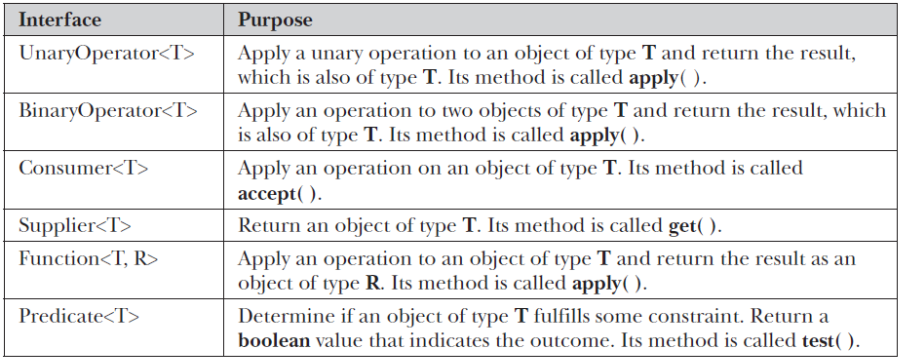
The following program shows the Function interface in action by using it to rework the earlier example called BlockLambdaExample that demonstrated block lambdas by implementing a factorial example. That example created its own functional interface called NumericFunc, but the built-in Function interface could have been used, as this version of the program illustrates:
//Use the Function built-in functional interface.
//Import the Function interface.
import java.util.function.Function;

public class FunctionExample {
	public static void main(String args[]) {
		// This block lambda computes the factorial of an int value.
		// This time, Function is the functional interface.
		Function<Integer, Integer> factorial = (n) -> {
			int result = 1;

			for (int i = 1; i <= n; i++)
				result = i * result;
			return result;
		};

		System.out.println("The factoral of 3 is " + factorial.apply(3));
		System.out.println("The factoral of 5 is " + factorial.apply(5));
	}
}