These annotations can be applied to any place where a type is being used.
For example, we can annotate the return type of a method.
These are declared annotated with @Target annotation.
Repeating Annotations
These are the annotations that can be applied to a single item more than once.
For an annotation to be repeatable it must be annotated with the @Repeatableannotation, which is defined in the java.lang.annotation package.
Its value field specifies the container type for the repeatable annotation.
The container is specified as an annotation whose value field is an array of the repeatableannotation type.
Hence, to create a repeatable annotation, firstly the container annotation is created, andthen the annotation type is specified as an argument to the @Repeatable annotation.
Predefined/Standard Annotations
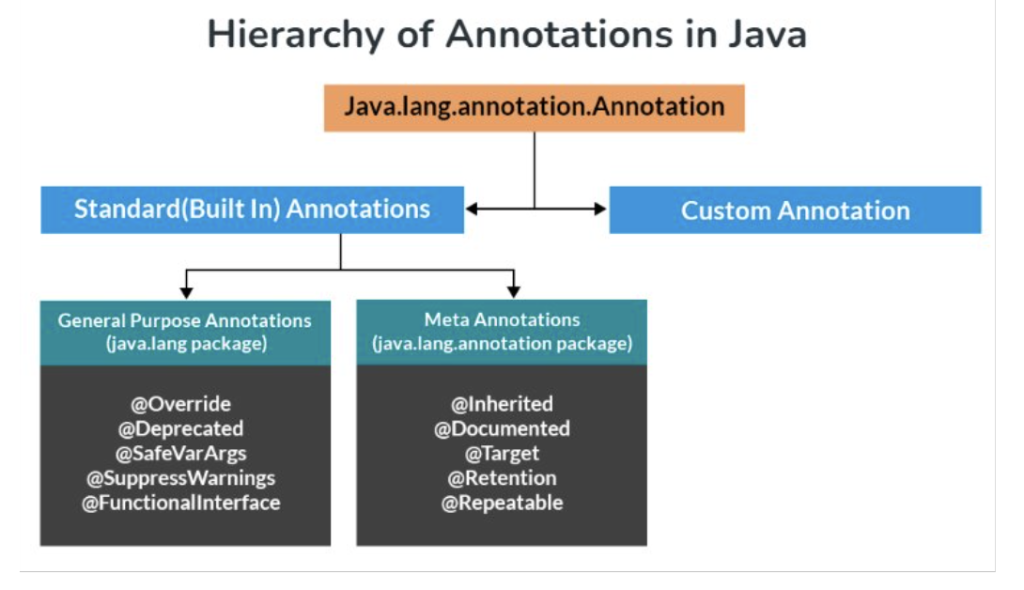
Java popularly defines seven built-in annotations as we have seen up in the hierarchydiagram.
Four are imported from java.lang.annotation: @Retention, @Documented, @Target, and@Inherited.
Three are included in java.lang: @Deprecated, @Override and @SuppressWarnings
@Deprecated
It is a marker annotation. It indicates that a declaration is obsolete and has been replacedby a newer form.
The Javadoc @deprecated tag should be used when an element has been deprecated.
@deprecated tag is for documentation and @Deprecated annotation is for runtimereflection.
@deprecated tag has higher priority than @Deprecated annotation when both aretogether used.
@Override
It is a marker annotation that can be used only on methods.
A method annotated with @Override must override a method from a superclass.
If it doesn’t, a compile-time error will result (see this for example).
It is used to ensure that a superclass method is actually overridden, and not simplyoverloaded.
@SuppressWarnings
It is used to inform the compiler to suppress specified compiler warnings.
The warnings to suppress are specified by name, in string form.
This type of annotation can be applied to any type of declaration.
Java groups warnings under two categories.
They are deprecated and unchecked.
Any unchecked warning is generated when a legacy code interfaces with a code that usesgenerics.
@Documented
It is a marker interface that tells a tool that an annotation is to be documented.
Annotations are not included in ‘Javadoc’ comments.
The use of @Documented annotation in the code enables tools like Javadoc to process itand include the annotation type information in the generated document.
@Target
It is designed to be used only as an annotation to another annotation.
@Target takes one argument, which must be constant from the ElementTypeenumeration.
This argument specifies the type of declarations to which the annotation can be applied.
The constants are shown below along with the type of the declaration to which theycorrespond.
@Inherited
@Inherited is a marker annotation that can be used only on annotation declaration.
It affects only annotations that will be used on class declarations.
@Inherited causes the annotation for a superclass to be inherited by a subclass.
Therefore, when a request for a specific annotation is made to the subclass, if thatannotation is not present in the subclass, then its superclass is checked.
If that annotation is present in the superclass, and if it is annotated with @Inherited, thenthat annotation will be returned.
User-Defined (Custom)
User-defined annotations can be used to annotate program elements, i.e. variables,constructors, methods, etc.
These annotations can be applied just before the declaration of an element (constructor,method, classes, etc).
Do keep these certain points as rules for custom annotations before implementing user-defined annotations.
AnnotationName is an interface.
The parameter should not be associated with method declarations and throws clauseshould not be used with method declaration.
Parameters will not have a null value but can have a default value.
default value is optional.
The return type of method should be either primitive, enum, string, class name, orarray of primitive, enum, string, or class name type.