
Inheritance Basics
- Using inheritance, you can create a general class that defines traits common to a set of related items.
- This class can then be inherited by other, more specific classes, each adding those things that are unique to it.
- In the terminology of Java, a class that is inherited is called a superclass.
- The class that does the inheriting is called a subclass.
- Therefore, a subclass is a specialized version of a superclass.
- It inherits all of the members defined by the superclass and adds its own, unique elements.
public class Shape {
	private String name;

	public String getName() {
		return name;
	}

	public void setName(String name) {
		this.name = name;
	}
}
public class Rectangle extends Shape {
private double width, height;
public double getWidth() {
return width;
}
public void setWidth(double width) {
this.width = width;
}
public double getHeight() {
return height;
}
public void setHeight(double height) {
this.height = height;
}
public double getArea() {
return getWidth() + getHeight();
}
}Member Access and Inheritance
Although a subclass includes all of the members of its superclass, it cannot access those members of the superclass that have been declared as private.
public class Rectangle extends Shape {
	private double width, height;

	// other codes here

	public void updateName() {
		name = "Rectangle";	// compile error since name is private in Shape
	}
}
This program will not compile because the use of j inside the sum( ) method of B causes an access violation. Since j is declared as private, it is only accessible by other members of its own class. Subclasses have no access to it.
Constructors and Inheritance
- Although a subclass inherits all of the methods and variables from superclass, it does not inherit constructors.
- Subclasses need to create its own constructor and add a call to the superclass’s constructor.
public class Shape {
	private String name;

	public Shape(String name) {
		setName(name);
	}

	public String getName() {
		return name;
	}

	public void setName(String name) {
		this.name = name;
	}

	@Override
	public String toString() {
		return "name: + " + getName();
	}
}
public class Rectangle extends Shape {
	private double width, height;

	public Rectangle(double width, double height) {
		this(width, height, "Rectangle");
	}

	public Rectangle(double width, double height, String name) {
		super(name);
		setWidth(width);
		setHeight(height);
	}

	// all other codes here

}
Using super Keyword to Call Superclass’s Constructors
- A superclass’s constructor is always called in addition to the a subclass’s constructor.
- The call super() can take any number of arguments appropriate to the various constructors available in the parent class, but it must be the first statement in the constructor.
- Example as above.
Using super Keyword to Access Superclass’s Members
- The second form of super acts somewhat like this, except that it always refers to the superclass of the subclass in which it is used.
- This usage has the following general form super.member
- Here, member can be either a method or an instance variable.
public class Rectangle extends Shape {
	private double width, height;

	// all other codes here

	@Override
	public String toString() {
		return super.toString() + ", width: " + getWidth() + ", height: " + getHeight();
	}

}
public class InheritanceExample {
public static void main(String[] args) {
Shape shape = new Shape("Shape");
System.out.println(shape);
Rectangle rect = new Rectangle(4, 6, "TheRectangle");
System.out.println(rect);
}
/*
* name: Shape
* name: TheRectangle, width: 4.0, height: 6.0
*/
}Creating a Multilevel Hierarchy
- Up to this point, we have been using simple class hierarchies that consist of only a superclass and a subclass.
- However, you can build hierarchies that contain as many layers of inheritance as you like.
- As mentioned, it is perfectly acceptable to use a subclass as a superclass of another.
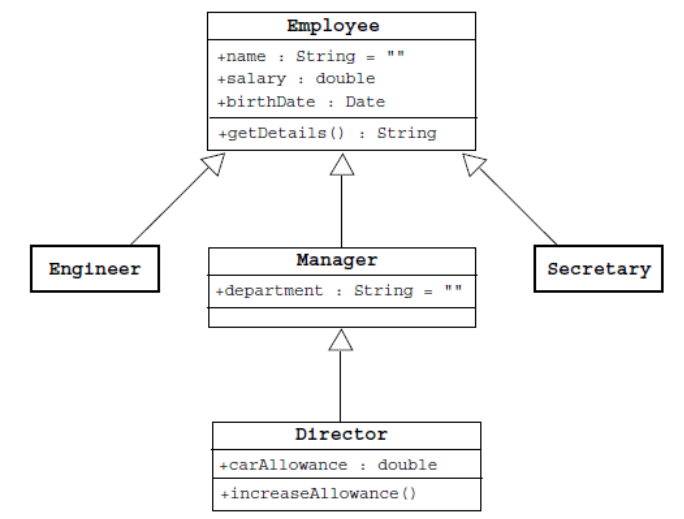
- The Employee class contains three attributes (name, salary, and birthdate), as well as one method (getDetails).
- The Manager class inherits all of these members and specifies an additional attribute, department, as well as the getDetails method.
- The Director class inherits all of the member of Employee and Manager and specifies a carAllowance attribute and a new method, increaseAllowance.
- Similarly, the Engineer and Secretary classes inherit the members of the Employee class and might specify additional members (not shown).
When are Constructors Executed?
- make up the hierarchy executed?
- For example, given a subclass called B and a superclass called A, is A’s constructor executed before B’s, or vice versa?
- The answer is that in a class hierarchy, constructors complete their execution in order of derivation, from superclass to subclass.
- Further, since super( ) must be the first statement executed in a subclass’ constructor, this order is the same whether or not super( ) is used.
- If super( ) is not used, then the default or parameterless constructor of each superclass will be executed.
public class CallingConstructorsExample {
	public static void main(String[] args) {
		// create object of class C
		C c = new C();
	}

	/*
	 * Inside A's constructor.
	 * Inside B's constructor.
	 * Inside C's constructor.
	 */
}

//Create a super class.
class A {

	A() {
		System.out.println("Inside A's constructor.");
	}

}

// Create a subclass by extending class A.
class B extends A {

	B() {
		System.out.println("Inside B's constructor.");
	}

}

//Create another subclass by extending B.
class C extends B {

	C() {
		System.out.println("Inside C's constructor.");
	}

}
Method Overriding
- In addition to producing a new class based on an old one by additional features, you can modify existing behaviour of the parent class.
- If a method is defined in a subclass so that the name, return type, and argument list match exactly those of a method in the parent class, then the new method is said to override the old one.
	// getDetails() in Shape (superclass)
	public String getDetails() {
		return "name: " + getName();
	}
// getDetails() in Rectangle (subclass)
@Override
public String getDetails() {
return super.getDetails() + ", width: " + getWidth() + ", height: " + getHeight();
}Overriden Methods Support Polymorphism
- While the examples in the preceding section demonstrate the mechanics of method overriding, they do not show its power.
- Indeed, if there were nothing more to method overriding than a name space convention, then it would be, at best, an interesting curiosity, but of little real value. However, this is not the case.
- Method overriding forms the basis for one of Java’s most powerful concepts: dynamic method dispatch.
- Dynamic method dispatch is the mechanism by which a call to an overridden method is resolved at run time, rather than compile time.
- Dynamic method dispatch is important because this is how Java implements run-time polymorphism.
Polymorphism
- An object has only one form (the one that is given to it when constructed).
- However, a variable is polymorphic because it can refer to objects of different forms.
- Java permits you to refer to an object with a variable that is one of the parent class type.
		// polymorphism
		Shape s = new Rectangle(2, 2, "polyshape");
System.out.println(s.getDetails());- Which getDetails method will be invoked here? From Shape or Rectangle class?
- This is the aspect of polymorphism, which is an important feature of object-oriented languages. The behaviour is not determined by the compile time type of the variable, instead it refers to during runtime.
- In the above codes, the getDetails method executed is from the object’s real type, the Rectangle class.
Why Override Methods?
- As stated earlier, overridden methods allow Java to support run-time polymorphism.
- Polymorphism is essential to object-oriented programming for one reason: it allows a general class to specify methods that will be common to all of its derivatives, while allowing subclasses to define the specific implementation of some or all of those methods.
- Overridden methods are another way that Java implements the “one interface, multiple methods” aspect of polymorphism.
Using Abstract Methods
- Abstract methods are those defined with abstract keyword at its method signature.
abstract type name(parameter-list); - Abstract methods mean there is no implementation provided, that is not method body.
abstract void callme();
There are situations in which you will want to define a superclass that declares the structure of a given abstraction without providing a complete implementation of every method. That is, sometimes you will want to create a superclass that only defines a generalized form that will be shared by all of its subclasses, leaving it to each subclass to fill in the details.
Using Abstract Classes
- Any class that contains one or more abstract methods must also be declared abstract.
- To declare a class abstract, you simply use the abstract keyword in front of the class keyword at the beginning of the class declaration.
- There can be no objects of an abstract class. That is, an abstract class cannot be directly instantiated with the new operator.
- Any subclass of an abstract class must either implement all of the abstract methods in the superclass, or be declared abstract itself.
public abstract class AbstractShape {
	private String name;

	public String getName() {
		return name;
	}

	public void setName(String name) {
		this.name = name;
	}

	public abstract double getArea();
}
public class Circle extends AbstractShape {
private double radius;
public Circle(double radius) {
this.radius = radius;
}
// circle needs to implement the inherited abstract methods
@Override
public double getArea() {
return Math.PI + Math.pow(radius, 2);
}
}Using final Keyword with Inheritance
The keyword final has three uses. First, it can be used to create the equivalent of a named constant. This use was described in the preceding chapter. The other two uses of final apply to inheritance.
Using final to prevent overriding
- To disallow a method from being overridden, specify final as a modifier at the start of its declaration.
- Methods declared as final cannot be overridden.
public abstract class AbstractShape {
	private String name;

	public String getName() {
		return name;
	}

	public void setName(String name) {
		this.name = name;
	}

	public abstract double getArea();

	public final void display() {
		System.out.println("name: " + getName() + ", area: " + getArea());
	}
}
The display() method in AbstractShape is final, which means it cannot be overriden in the subclass i.e. Circle.
Using final to prevent inheritance
- Sometimes you will want to prevent a class from being inherited. To do this, precede the class declaration with final.
- Declaring a class as final implicitly declares all of its methods as final, too.
public final class Circle extends AbstractShape {
	private double radius;

	public Circle(double radius) {
		this.radius = radius;
	}

	// circle needs to implement the inherited abstract methods
	@Override
	public double getArea() {
		return Math.PI + Math.pow(radius, 2);
	}

}
The Object Class
- All other classes are subclasses of Object.
- That is, Object is a superclass of all other classes.
- This means that a reference variable of type Object can refer to an object of any other class.
- Object defines the following methods, which means that they are available in every object.
| Method | Purpose |
| Object clone() | Creates a new object that is the same as the object being cloned. |
| boolean equals(Object object) | Determines whether one object is equal to another. |
| Class<?> getClass() | Obtains the class of an object at runtime. |
| int hashCode() | Returns the hash code associated with invoing object. |
| String toString() | Returns a string that describes the object. |