
Introduction
- The Java platform includes a collection framework.
- A collection is an object that represents a group of objects (such as the classic Vector class).
- A collections framework is a unified architecture for representing and manipulating collections, enabling collections to be manipulated independently of implementation details.
Advantages of Collections
- Reduces programming effort by providing data structures and algorithms so you don’t have to write them yourself.
- Increases performance by providing high-performance implementation of data structures and algorithms. Because various implementations of each interface are interchangeable, programs can be tuned by switching implementations.
- Provides interoperability between unrelated APIs by establishing a common language to pass collections back and forth.
- Reduces the effort required to learn APIs by requiring you to learn multiple ad hoc collection APIs.
- Reduces the effort required to design and implement APIs by not requiring you to produce ad hoc collection APIs.
- Fosters software reuse by providing a standard interface for collections and algorithms with which to manipulate them.
Arrays
- An array is a group of like-typed variables that are referred to by a common name.
- Array of any type (primitive or class) can be created and may have one or more dimensions.
- A specific element in an array is accessed by its index.
- Arrays offer a convenient means of grouping related information.
- In Java, an array is an object.
- Array is a fixed size list of values.
- When declaring an array, the size must be supplied.
One-Dimensional Arrays
- A one-dimensional array is, essentially, a list of like-typed variables.
- Syntax to declare a one-dimensional array.
type array-var = new type [size];
int month_days = new int[12]; - To access and display array element, use the index.
System.out.println(month_days[3]);
		// one-dimensional array
		System.out.println("== one-dimensional array ==");
		String names[] = new String[5];

		// check the size of array
		System.out.println("Array size: " + names.length);

		// set values to array
		names[0] = "Alan";
		names[1] = "Bob";
		names[2] = "Charles";
		names[3] = "David";
		names[4] = "George";

		// use foreach loop to display values in array
		System.out.println("== use foreach loop to display values ==");
		for (String n : names) {
			System.out.println(n);
		}

		System.out.println("== use traditional for loop instead ==");
		for (int index = 0; index < names.length; index++) {
			System.out.println(names[index]);
		}
Multi-Dimensional Array
- In Java, multidimensional arrays are actually arrays of arrays.
- To declare a multidimensional array variable, specify each additional index using another set of square brackets.
int twoD[][] = new int[4][5]; - This allocates a 4 by 5 array and assigns it to twoD.
- Internally, this matrix is implemented as an array of arrays of int.
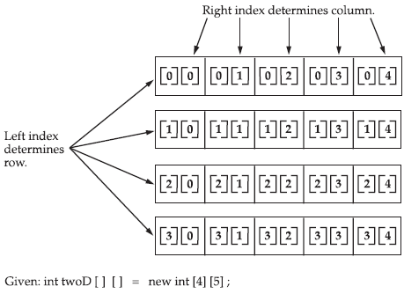
		// two-dimensional array
		System.out.println("== two-dimensional array ==");
		int matrix[][] = new int[5][5];
		for (int row = 0; row < 5; row++) {
			for (int col = 0; col < 5; col++) {
				// generate random number and assign to matrix
				matrix[row][col] = (int) (Math.random() * 100);

				// display values
				System.out.print(matrix[row][col] + "\t");
			}
			System.out.println();
		}
Jagged Array
- When you allocate memory for a multidimensional array, you need only specify the memory for the first (leftmost) dimension.
- You can allocate the remaining dimensions separately.
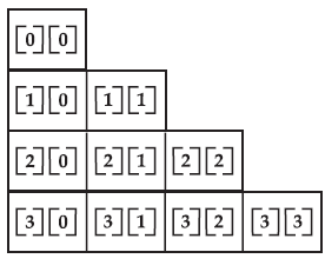
int twoD[][] = new int[4][];
twoD[0] = new int[1];
twoD[1] = new int[2];
twoD[2] = new int[3];
twoD[3] = new int[4];
The array created by this program looks like this:
		// jagged array
		System.out.println("== jagged array ==");
		int jagged[][] = new int[5][];
		int size = 1;
		for (int row = 0; row < 5; row++) {
			// set dimension for the second array
			jagged[row] = new int[size];
			for (int col = 0; col < size; col++) {
				jagged[row][col] = (int) (Math.random() * 100);
				System.out.print(jagged[row][col] + "\t");
			}
			System.out.println();
			size++;
		}
Alternative Array Declaration Syntax
- There is a second form that may be used to declare an array:
type[ ] var-name; - Here, the square brackets follow the type specifier, and not the name of the array variable.
- For example, the following two declarations are equivalent:
int al[] = new int[3];
int[] a2 = new int[3]; - This alternative declaration form offers convenience when declaring several arrays at the same time.
int[] nums, nums2, nums3; // create three arrays
int nums[], nums2[], nums3[]; // create three arrays
Assigning Array References
- As with other objects, when you assign one array reference variable to another, you are simply changing what object that variable refers to.
- You are not causing a copy of the array to be made, nor are you causing the contents of one array to be copied to the other.
Using the length Member
- All array indices in Java begin at 0.
- The number of elements in an array is stored as part of the array object in the length attribute.
- If an out-of-bounds runtime access occurs, then a runtime exception is thrown.
int[] arr = new int[5];
int arrayLength = arr.length;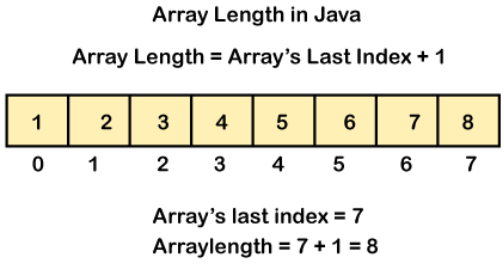
List Interface
- In Java, the List interface is an ordered collection that allows us to store and access elements sequentially.
- It extends the Collection interface.
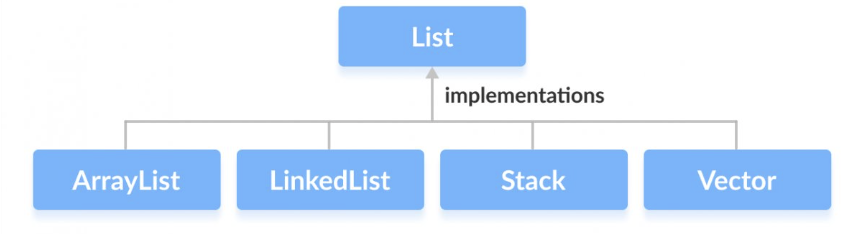
import java.util.ArrayList;
import java.util.Collections;

/*
 * list is an ordered collection, duplicates allowed
 */
public class ListExample {
	public static void main(String[] args) {
		// create a list of string values
		ArrayList<String> names = new ArrayList<String>();

		// add values to list
		names.add("John");
		names.add("Sam");
		names.add("Bob");

		// check the size of names
		System.out.println("before add, size is: " + names.size());

		// add a new value
		names.add("Sarah");
		System.out.println("after add, size is: " + names.size());

		System.out.println("== use foreach to display values ==");
		for (String n : names) {
			System.out.println(n);
		}

		// read individual value from list
		System.out.println("second value is: " + names.get(1));

		System.out.println("before remove: " + names);

		// remove value from list
		String result = names.remove(0);
		System.out.println("result: " + result);
		System.out.println("after remove: " + names);

		// list allows duplicates
		names.add("Sam");
		System.out.println("after add duplicate: " + names);

		// edit a single value in list
		names.set(0, "Samantha");
		System.out.println("after edit: " + names);

		// sort values in names
		Collections.sort(names);
		System.out.println("sorted: " + names);

	}
}
Set Interface
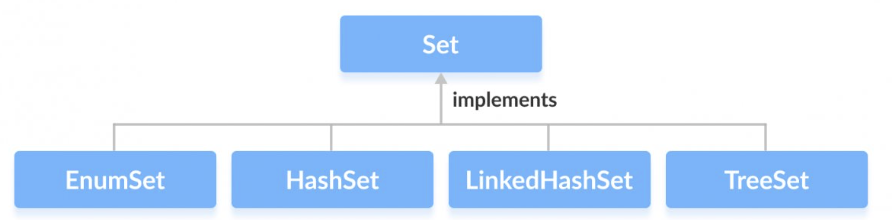
- The Set interface of the Java Collections framework provides the features of the mathematical set in Java.
- It extends the Collection interface.
- Unlike the List interface, sets cannot contain duplicate elements.
import java.util.HashSet;
import java.util.Set;
import java.util.TreeSet;

/*
 * set is an unordered collection, no duplicates allowed
 */
public class SetExample {
	public static void main(String[] args) {
		// start with hashset - values are not ordered
		System.out.println("== hashset ==");
		Set<String> names = new HashSet<String>();

		// get set size
		System.out.println("size: " + names.size());

		// add values to set
		names.add("John");
		names.add("Sam");
		System.out.println("size: " + names.size());
		System.out.println(names);

		// add another value
		names.add("Bob");
		System.out.println(names);

		// add yet another value
		names.add("Sarah");
		System.out.println(names);

		names.add("Sarah"); // duplicate
		System.out.println(names);	// not added

		names.add("Alan");
		System.out.println(names);

		// try with treeset - values will be sorted automatically
		System.out.println("== treeset ==");
		names = new TreeSet<String>();
		names.add("John");
		names.add("Sam");
		System.out.println(names);

		names.add("Bob");
		System.out.println(names);

		names.add("Sarah");
		System.out.println(names);

		names.add("Alan");
		System.out.println(names);
	}
}
Map Interface
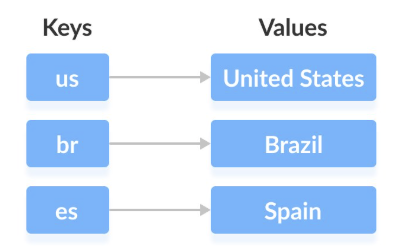
- The Map interface of the Java collection framework provides the functionality of the map data structure.
- In Java, elements in Map are stored as key/value pairs. Keys are unique values associated with individual values.
- A map cannot contain duplicate keys. And each key is associated with a single value.
import java.util.*;

public class MapExample {
	public static void main(String[] args) {
		// map stores key/value pairs
		// treemap with string key and value
		TreeMap<String, String> country = new TreeMap<String, String>();

		// add pairs to map
		country.put("us", "United States");
		country.put("sg", "Singapore");
		country.put("my", "Malaysia");
		country.put("ph", "Philipines");
		System.out.println(country);

		country.put("au", "Australia");
		System.out.println(country);

		// read value using key
		System.out.println("value: " + country.get("au"));

		// key must be unique
		// try - overwrite previous value
		country.put("au", "New Zealand");
		System.out.println(country);

		country.put("AU", "Australia");	// added, new key
		System.out.println(country);

		System.out.println("== get all keys ==");
		Set<String> keys = country.keySet();
		System.out.println(keys);

		System.out.println("== use keys to iterate map ==");
		for(String k : keys) {
			System.out.println(k + "=>" + country.get(k));
		}

		System.out.println("== get all values ==");
		Collection<String> values = country.values();
		System.out.println(values);

		System.out.println("== get all pairs ==");
		Set<Map.Entry<String, String>> entries = country.entrySet();
		System.out.println(entries);

		System.out.println("== use loop to display all pairs ==");
		for(Map.Entry<String, String> pair : entries) {
			System.out.println(pair.getKey() + " = " + pair.getValue());
		}
	}
}
Iterator Interface
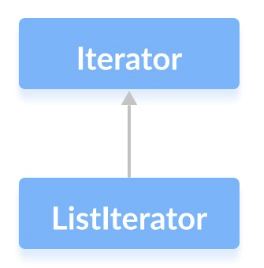
- The Iterator interface of the Java collections framework allows us to access elements of a collection. It has a subinterface ListIterator.
- All the Java collections include an iterator() method.
- This method returns an instance of iterator used to iterate over elements of collections.
import java.util.ArrayList;
import java.util.Iterator;

public class IteratorExample {
	public static void main(String[] args) {
		ArrayList<String> names = new ArrayList<String>();

		names.add("John");
		names.add("Sam");
		names.add("Sarah");
		names.add("Nora");

		// get iterator from list
		Iterator<String> iterator =  names.iterator();

		System.out.println("== with iterator ==");
		// use loop
		while(iterator.hasNext()) {
			// display and move to next
			System.out.println(iterator.next());
		}

		// use while with index without iterator
		System.out.println("== without iterator ==");
		int index = 0;
		while(index < names.size()) {
			System.out.println(names.get(index));
			index++;
		}
	}
}
The foreach Style for Loop
- For-each is another array traversing technique like for loop, while loop, do-while loopintroduced in Java 5.
- It starts with the keyword for like a normal for-loop.
- Instead of declaring and initializing a loop counter variable, you declare a variable that isthe same type as the base type of the array, followed by a colon, which is then followedby the array name.
- In the loop body, you can use the loop variable you created rather than using an indexedarray element.
- It’s commonly used to iterate over an array or a Collections class (eg, ArrayList)