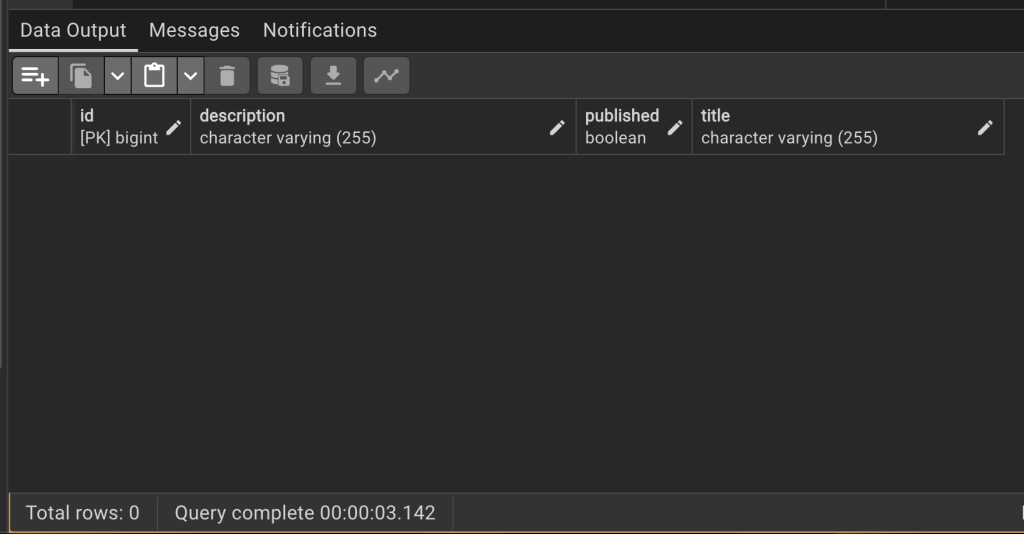
What is a Database?
A database is a set of data stored in a computer. This data is usually structured in a way that makes the data easily accessible.
What is a Relational Database?
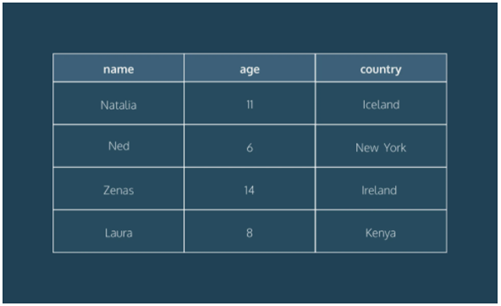
A relational database is a type of database. It uses a structure that allows us to identify and access data in relation to another piece of data in the database. Often, data in a relational database is organized into tables.
Table: Rows and Columns
Tables can have hundreds, thousands, sometimes even millions of rows of data. These rows are often called records.
Tables can also have many columns of data. Columns are labelled with a descriptive name (say, age for example) and have a specific data type.
For example, a column called age may have a type of INTEGER (denoting the type of data it is meant to hold).
What is ORM?
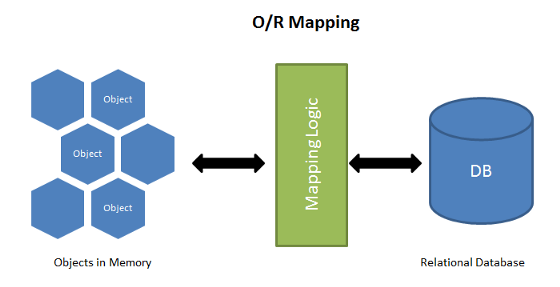
ORM sets the mapping between the set of objects which are written in the preferred programming language like JavaScript and relational database like SQL. It hides and encapsulates the SQL queries into objects and instead of SQL queries we can directly use the objects to implement the SQL query.
What is JPA?
The Java Persistence API (JPA) is a specification of Java. It is used to persist data between Java object and relational database. JPA acts as a bridge between object-oriented domain models and relational database systems.
As JPA is just a specification, it does not perform any operation by itself. It requires an implementation. So, ORM tools like Hibernate, TopLink and iBatis implements JPA specifications for data persistence.
What is Hibernate?
Hibernate is a Java framework that simplifies the development of Java application to interact with the database. It is an open source, lightweight, ORM (Object Relational Mapping) tool. Hibernate implements the specifications of JPA (Java Persistence API) for data persistence.
What is Spring Boot JPA?
Spring Boot JPA is a Java specification for managing relational data in Java applications. It allows us to access and persist data between Java object/ class and relational database.
JPA follows Object-Relation Mapping (ORM). It is a set of interfaces. It also provides a runtime EntityManager API for processing queries and transactions on the objects against the database.
It uses a platform-independent object-oriented query language JPQL (Java Persistent Query Language).
JPA Architecture
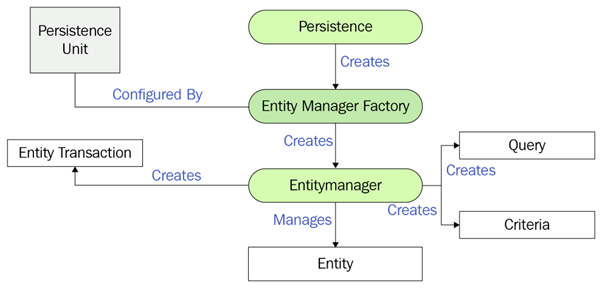
- Entity
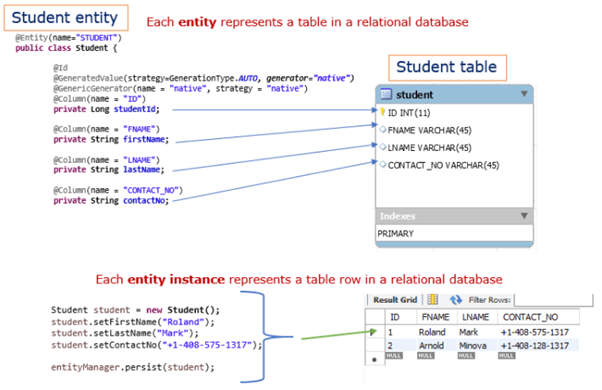
- An entity is a persistence domain object. Each Entity represents a table in a relational database, and each entity instance corresponds to a row in that table.
- JPA uses Annotations or XML to map entities to a Relational database.
- The persistent state of an entity fields or properties (setter and getter methods) use object/relational mapping annotations to map the entities and entity relationships to the relational data in the underlying data store.
- Persistence Unit
- A persistence unit defines a set of all entity classes that are managed by EntityManager instances in an application.
- This set of entity classes represents the data contained within a single data store.
- Persistence units are defined by the persistence.xml configuration file.
- JPA uses the persistence.xml file to create the connection and setup the required environment. Provides information which is necessary for making database connections.
- Persistence Class
- Persistence (javax.persistence.Persistence) class contains java static methods to get EntityManagerFactory instances.
- Since JPA 2.1 you can generatedatabase schemas and/or tables and/or create DDL scripts as determined by the supplied properties.
- EntityManagerFactory
- EntityManagerFactory (javax.persistence.EntityManagerFactory) class is a factory for EntityManagers.
- During the application startup time EntityManagerFactory is created with the help of Persistence-Unit.
- Typically, EntityManagerFactory is created once (One EntityManagerfactory object per Database) and kept alive for later use.
- EntityManager
- a. EntityManager is an interface to perform main actual database interactions.
- Persistence Context
- A persistence context handles a set of entities which hold data to be persisted in some persistence store (e.g. database).
- Each EntityManager instance is associated with a PersistenceContext.
- EntityTransaction
- A transaction is a set of operations that either fail or succeed as a unit.
- A database transaction consists of a set of SQL operations that are committed or rolled back as a single unit
- Any kind of modifications initiated via EntityManager object are placed within a transaction. An EntityManager object helps creating an EntityTransaction
Example of Spring Data JPA
- Use Spring Initializr or STS to create a new project with below settings.
- Project: Maven
- Language: Java
- Spring Boot: default
- Group: com.example
- Artifact: spring-data-jpa-demo
- Name: spring-data-jpa-demo
- Description: Demo project for Spring Data JPA
- Package name: com.example.spring-data-jpa-demo
- Packaging: Jar
- Java: choose your Java version
- Dependencies: Spring Web, Spring Data JPA, PostgreSQL Driver
- Click Generate. Extract the downloaded zip file then import it into Eclipse.
Add Spring Data JPA dependency into existing project
If you have already an existing Maven project and want to add Spring Data JPA dependency, add below codes into pom.xml
<dependency>
	<groupId>org.springframework.boot</groupId>
	<artifactId>spring-boot-starter-data-jpa</artifactId>
</dependency>
Connect to PostgreSQL database
Add below configurations into application.properties file;
spring.datasource.url=jdbc:postgresql://localhost:5432/testdb
spring.datasource.username=postgres
spring.datasource.password=123
spring.jpa.properties.hibernate.jdbc.lob.non_contextual_creation=true
spring.jpa.properties.hibernate.dialect=org.hibernate.dialect.PostgreSQLDialect

# Hibernate ddl auto (create, create-drop, validate, update)
spring.jpa.hibernate.ddl-auto=update

#show sql values
logging.level.org.hibernate.type.descriptor.sql=trace
logging.level.org.hibernate.type.descriptor.sql.BasicBinder=TRACE
logging.level.org.hibernate.SQL=DEBUG
Create JPA entity class to represent a table
Our Data model is Tutorial with four fields: id, title, description, published.
package com.example.springbootjpademo;

import jakarta.persistence.Column;
import jakarta.persistence.Entity;
import jakarta.persistence.GeneratedValue;
import jakarta.persistence.GenerationType;
import jakarta.persistence.Id;
import jakarta.persistence.Table;

@Entity
@Table(name = "tutorials")
public class Tutorial {

	@Id
	@GeneratedValue(strategy = GenerationType.AUTO)
	private long id;

	@Column(name = "title")
	private String title;

	@Column(name = "description")
	private String description;

	@Column(name = "published")
	private boolean published;

	public Tutorial() {

	}

	public Tutorial(String title, String description, boolean published) {
		this.title = title;
		this.description = description;
		this.published = published;
	}

	public long getId() {
		return id;
	}

	public String getTitle() {
		return title;
	}

	public void setTitle(String title) {
		this.title = title;
	}

	public String getDescription() {
		return description;
	}

	public void setDescription(String description) {
		this.description = description;
	}

	public boolean isPublished() {
		return published;
	}

	public void setPublished(boolean isPublished) {
		this.published = isPublished;
	}

	@Override
	public String toString() {
		return "Tutorial [id=" + id + ", title=" + title + ", desc=" + description + ", published=" + published + "]";
	}
}
Create a CRUD Repository interface for JPA entity
Let us create a repository to interact with Tutorials from the database.
package com.example.springbootjpademo;

import java.util.List;
import org.springframework.data.jpa.repository.JpaRepository;

public interface TutorialRepository extends JpaRepository<Tutorial, Long> {

	List<Tutorial> findByPublished(boolean published);

	List<Tutorial> findByTitleContaining(String title);
}
Using Spring JPA Query Method
Now we can use JpaRepository’s methods: save(), findOne(), findById(), findAll(), count(), delete(), deleteById()… without implementing these methods.
Using CRUD Repository interface in REST Controller
Finally, we create a controller that provides APIs for creating, retrieving, updating, deleting and finding Tutorials.
package com.example.springbootjpademo;

import java.util.ArrayList;
import java.util.List;
import java.util.Optional;

import org.springframework.beans.factory.annotation.Autowired;
import org.springframework.http.HttpStatus;
import org.springframework.http.ResponseEntity;
import org.springframework.web.bind.annotation.CrossOrigin;
import org.springframework.web.bind.annotation.DeleteMapping;
import org.springframework.web.bind.annotation.GetMapping;
import org.springframework.web.bind.annotation.PathVariable;
import org.springframework.web.bind.annotation.PostMapping;
import org.springframework.web.bind.annotation.PutMapping;
import org.springframework.web.bind.annotation.RequestBody;
import org.springframework.web.bind.annotation.RequestMapping;
import org.springframework.web.bind.annotation.RequestParam;
import org.springframework.web.bind.annotation.RestController;


@RestController
@RequestMapping("/api")
public class TutorialController {

	@Autowired
	TutorialRepository tutorialRepository;

	@GetMapping("/tutorials")
	public ResponseEntity<List<Tutorial>> getAllTutorials(@RequestParam(required = false) String title) {
		try {
			List<Tutorial> tutorials = new ArrayList<Tutorial>();

			if (title == null)
				tutorialRepository.findAll().forEach(tutorials::add);
			else
				tutorialRepository.findByTitleContaining(title).forEach(tutorials::add);

			if (tutorials.isEmpty()) {
				return new ResponseEntity<>(HttpStatus.NO_CONTENT);
			}

			return new ResponseEntity<>(tutorials, HttpStatus.OK);
		} catch (Exception e) {
			return new ResponseEntity<>( HttpStatus.INTERNAL_SERVER_ERROR);
		}
	}

	@GetMapping("/tutorials/{id}")
	public ResponseEntity<Tutorial> getTutorialById(@PathVariable("id") long id) {
		Optional<Tutorial> tutorialData = tutorialRepository.findById(id);

		if (tutorialData.isPresent()) {
			return new ResponseEntity<>(tutorialData.get(), HttpStatus.OK);
		} else {
			return new ResponseEntity<>(HttpStatus.NOT_FOUND);
		}
	}

	@PostMapping("/tutorials")
	public ResponseEntity<Tutorial> createTutorial(@RequestBody Tutorial tutorial) {
		try {
			Tutorial _tutorial = tutorialRepository
					.save(new Tutorial(tutorial.getTitle(), tutorial.getDescription(), false));
			return new ResponseEntity<>(_tutorial, HttpStatus.CREATED);
		} catch (Exception e) {
			return new ResponseEntity<>( HttpStatus.INTERNAL_SERVER_ERROR);
		}
	}

	@PutMapping("/tutorials/{id}")
	public ResponseEntity<Tutorial> updateTutorial(@PathVariable("id") long id, @RequestBody Tutorial tutorial) {
		Optional<Tutorial> tutorialData = tutorialRepository.findById(id);

		if (tutorialData.isPresent()) {
			Tutorial _tutorial = tutorialData.get();
			_tutorial.setTitle(tutorial.getTitle());
			_tutorial.setDescription(tutorial.getDescription());
			_tutorial.setPublished(tutorial.isPublished());
			return new ResponseEntity<>(tutorialRepository.save(_tutorial), HttpStatus.OK);
		} else {
			return new ResponseEntity<>(HttpStatus.NOT_FOUND);
		}
	}

	@DeleteMapping("/tutorials/{id}")
	public ResponseEntity<HttpStatus> deleteTutorial(@PathVariable("id") long id) {
		try {
			tutorialRepository.deleteById(id);
			return new ResponseEntity<>(HttpStatus.NO_CONTENT);
		} catch (Exception e) {
			return new ResponseEntity<>(HttpStatus.INTERNAL_SERVER_ERROR);
		}
	}

	@DeleteMapping("/tutorials")
	public ResponseEntity<HttpStatus> deleteAllTutorials() {
		try {
			tutorialRepository.deleteAll();
			return new ResponseEntity<>(HttpStatus.NO_CONTENT);
		} catch (Exception e) {
			return new ResponseEntity<>(HttpStatus.INTERNAL_SERVER_ERROR);
		}

	}

	@GetMapping("/tutorials/published")
	public ResponseEntity<List<Tutorial>> findByPublished() {
		try {
			List<Tutorial> tutorials = tutorialRepository.findByPublished(true);

			if (tutorials.isEmpty()) {
				return new ResponseEntity<>(HttpStatus.NO_CONTENT);
			}
			return new ResponseEntity<>(tutorials, HttpStatus.OK);
		} catch (Exception e) {
			return new ResponseEntity<>(HttpStatus.INTERNAL_SERVER_ERROR);
		}
	}
}
Run and Test
- Run the project.
- Use Postman to test the service.
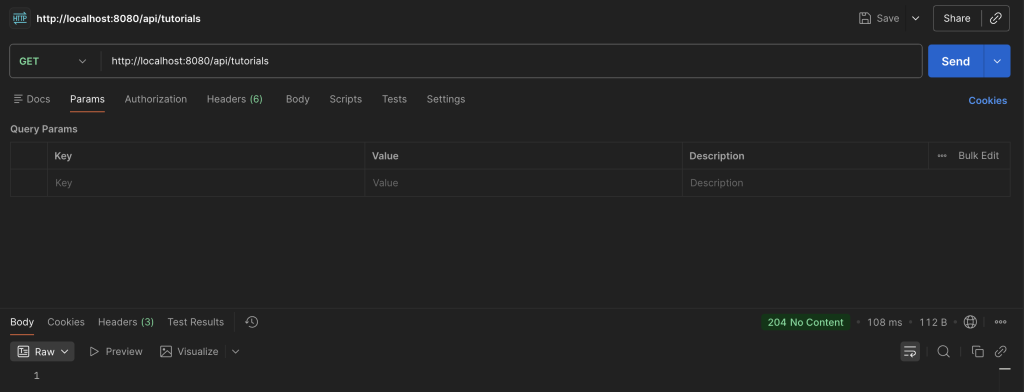
In the URL area, enter http://localhost:8080/api/tutorials
Make sure HTTP method is set to GET, click Send.
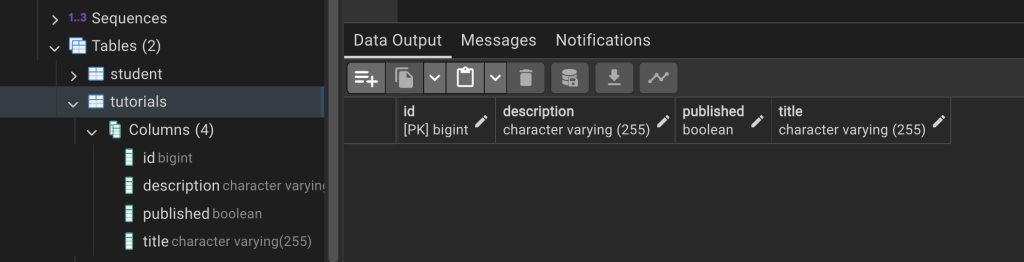
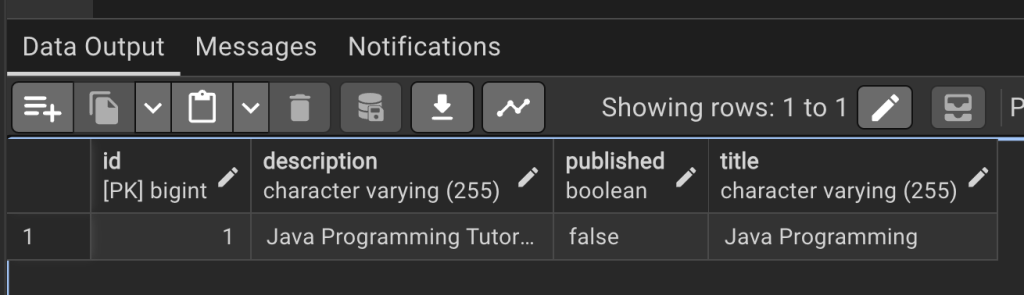
- Table tutorials will be automatically generated in database.
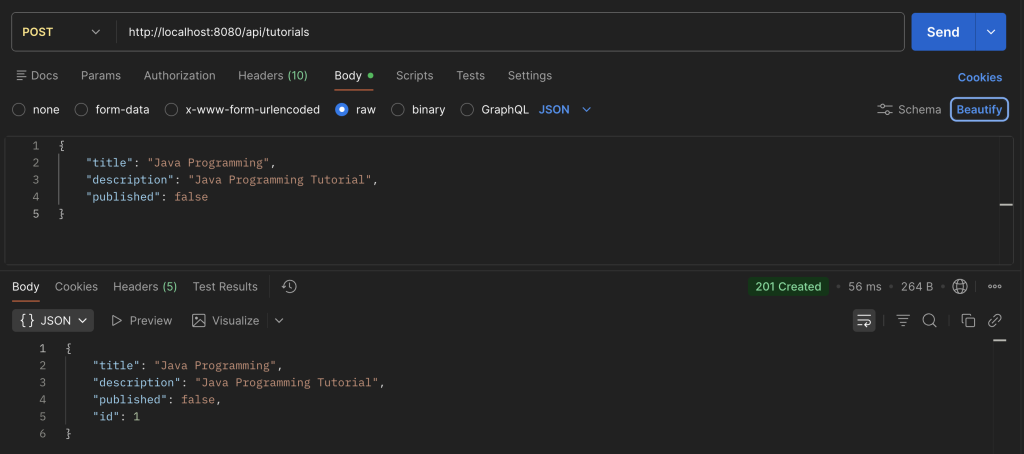
- Try to insert a new tutorial record by sending a POST request.
Set HTTP method to POST.
In the URL area, enter http://localhost:8080/api/tutorials
{
    "title": "Java Programming",
    "description": "Java Programming Tutorial",
    "published": false
}- Verify that the new record is added into table tutorials.
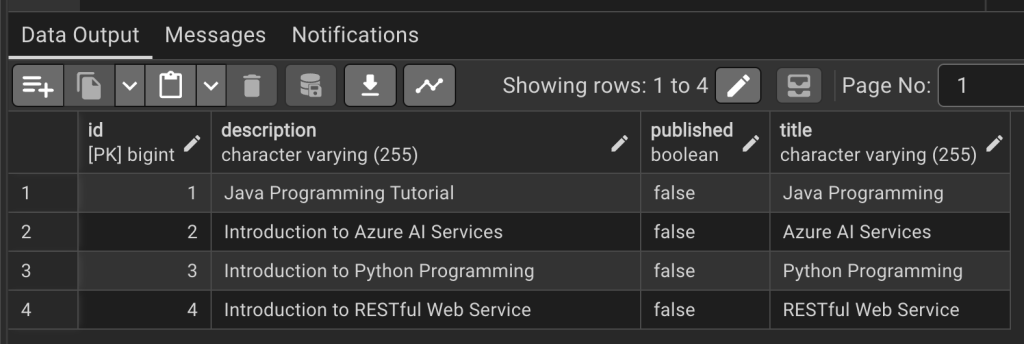
- Try to add another few records into the table and verify.
{
    "title": "Azure AI Services",
    "description": "Introduction to Azure AI Services",
    "published": false
}
{
"title": "Python Programming",
"description": "Introduction to Python Programming",
"published": false
}{
"title": "RESTful Web Service",
"description": "Introduction to RESTful Web Service",
"published": false
}
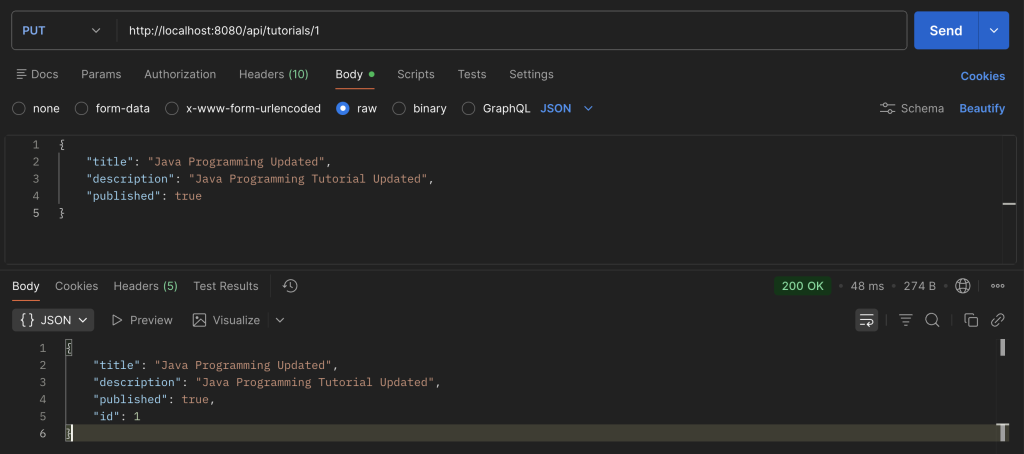
- Try to update existing record.
Use this URL to update htpp://localhost:8080/api/tutorials/1
Set HTTP method to PUT
{
    "title": "Java Programming Updated",
    "description": "Java Programming Tutorial Updated",
    "published": true
}
- Verify the update in table tutorials.
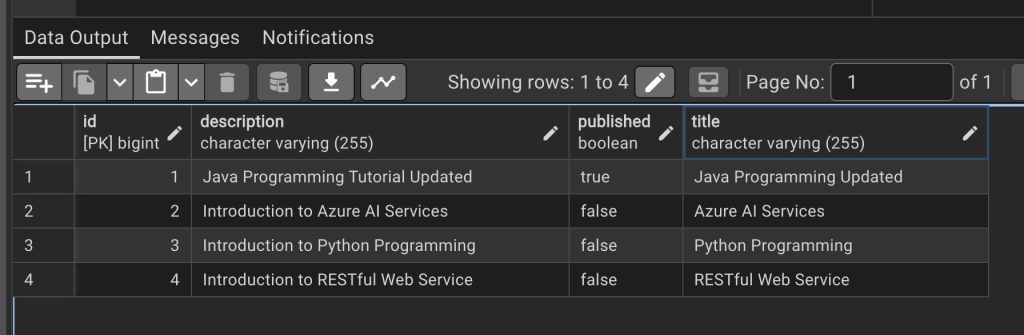
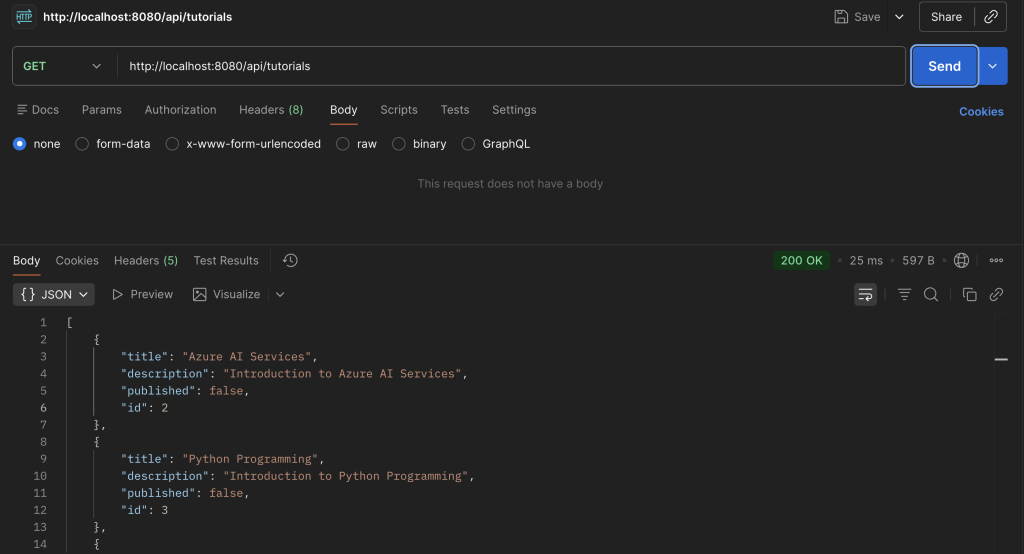
- Get all tutorial records.
Use this URL http://localhost:8080/api/tutorials
Set HTTP method to GET
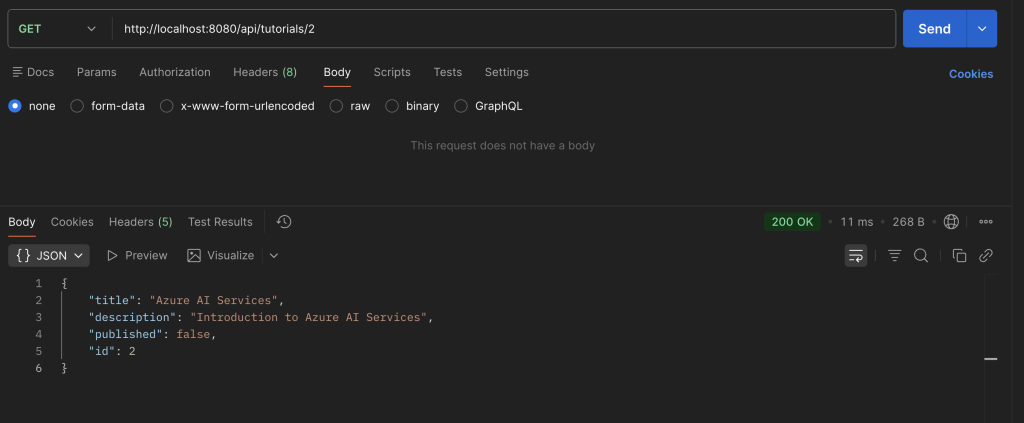
- Get a record by id.
http://localhost:8080/api/tutorials/2
Set HTTP method to GET
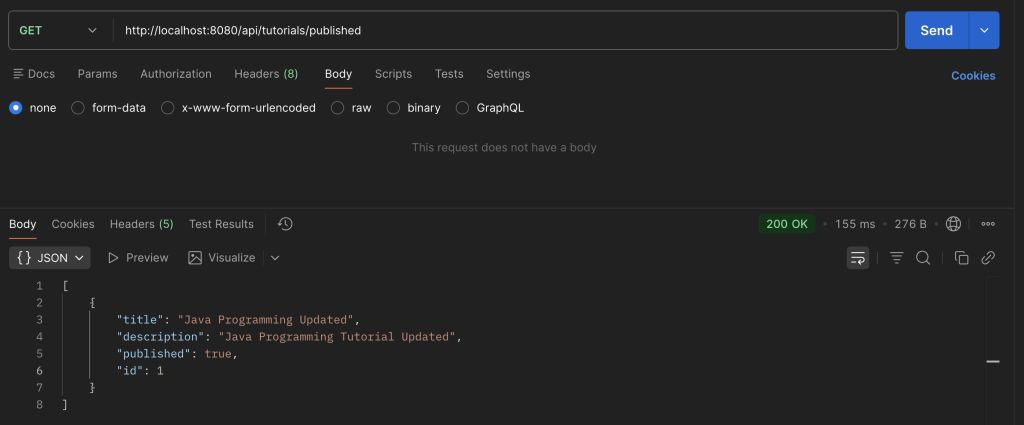
- Find all published tutorials.
http://localhost:8080/api/tutorials/published
HTTP method: GET
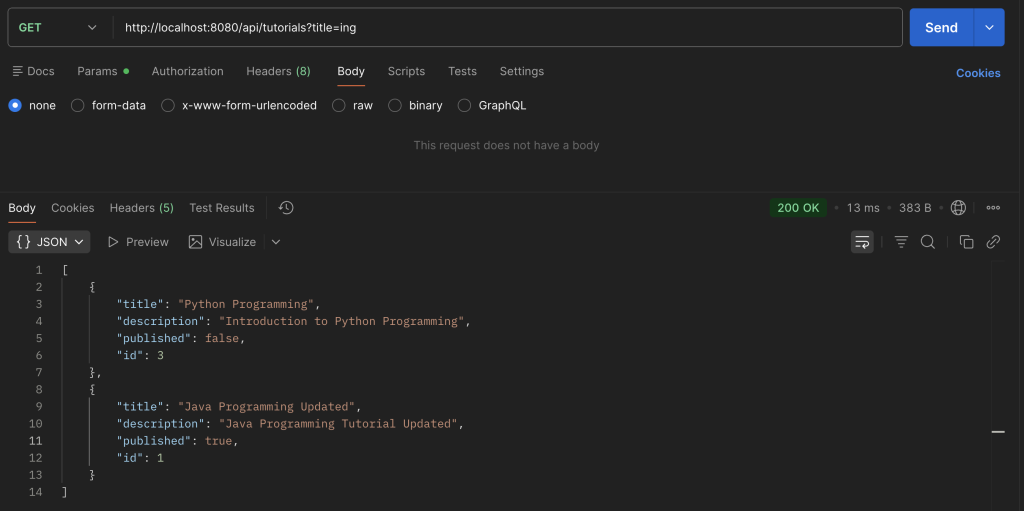
- Find all tutorials which title contains ‘ing’.
http://localhost:8080/api/tutorials?title=ing
HTTP method: GET
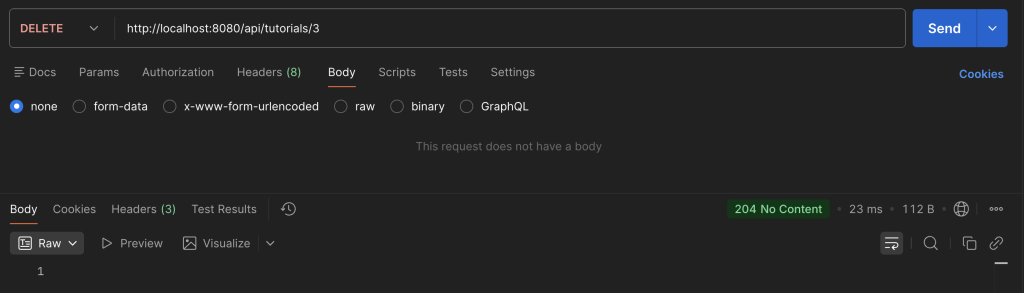
- Delete a tutorial record.
http://localhost:8080/api/tutorials/3
HTTP method: DELETE
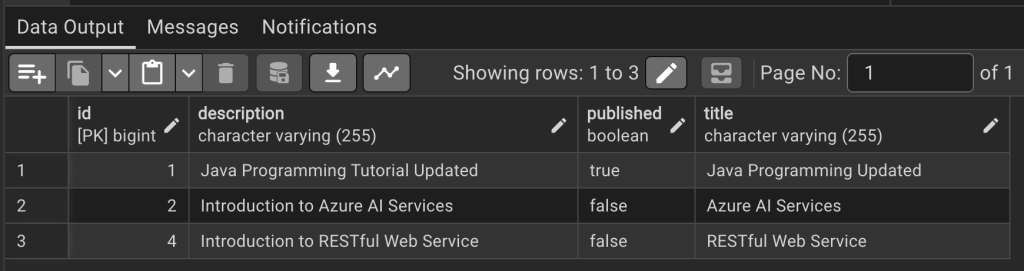
- Verify record deleted in database.
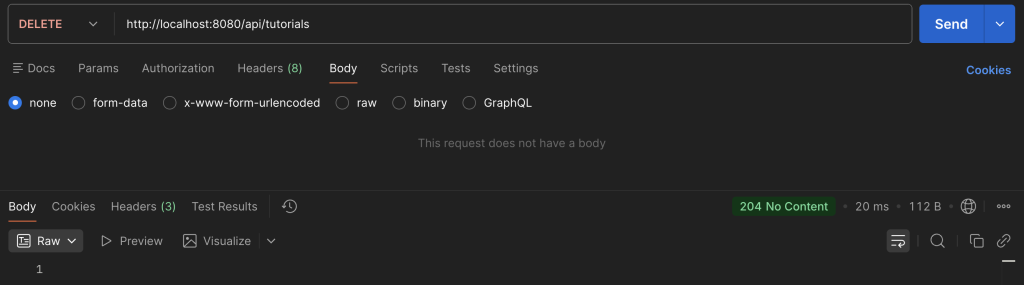
- Finally, delete all records in table.
http://localhost:8080/api/tutorials
HTTP method: DELETE
- Verify table is now empty.