
Lambda expressions was added to Java by JDK 8.
Introducing Lambda Expressions
Key to understanding Java’s implementation of lambda expressions are two constructs. The first is the lambda expression, itself. The second is the functional interface. Let’s begin with a simple definition of each.
A lambda expression is, essentially, an anonymous (that is, unnamed) method. However, this method is not executed on its own. Instead, it is used to implement a method defined by a functional interface. Thus, a lambda expression results in a form of anonymous class. Lambda expressions are also commonly referred to as closures.
A functional interface is an interface that contains one and only one abstract method.
Lambda Expression Fundamental
The new operator, sometimes referred to as the lambda operator or the arrow operator, is −>.
- It divides a lambda expression into two parts.
- The left side specifies any parameters required by the lambda expression.
- On the right side is the lambda body, which specifies the actions of the lambda expression.
Java defines two types of lambda bodies.
- Single expressions.
- Block of codes.
() -> 123.45
() -> Math.random() * 100
(n) -> (n % 2) == 0
Functional Interfaces
A functional interface is an interface that specifies only one abstract method.
public interface Greeting {
	public String greet();
}
public class EnglishGreetingImpl implements Greeting {
@Override
public String greet() {
return "Hello";
}
}public class ItalianGreetingImpl implements Greeting {
@Override
public String greet() {
return "Ciao";
}
}public class LambdaExample {
public static void main(String[] args) {
// create object from class
EnglishGreetingImpl english = new EnglishGreetingImpl();
System.out.println(english.greet());
ItalianGreetingImpl italian = new ItalianGreetingImpl();
System.out.println(italian.greet());
// polymorphism
Greeting g = new EnglishGreetingImpl();
System.out.println(g.greet());
g = new ItalianGreetingImpl();
System.out.println(g.greet());
// spanish
// anonymous class
g = new Greeting() { // class start
@Override
public String greet() {
return "Hola";
}
}; // class end
System.out.println(g.greet()); // Hola
// malay
g = new Greeting() { // class start
@Override
public String greet() {
return "Selamat";
}
}; // class end
System.out.println(g.greet()); // Selamat
// lambda expression
// anonymous function
// japanese
g = () -> "Konichiwa";
System.out.println(g.greet()); // Konichiwa
// korean
g = () -> "Anyeong";
System.out.println(g.greet()); // Anyeong
}
}Block Lambda Expressions
Lambdas that have block bodies are sometimes referred to as block lambdas.
//A block lambda that computes the factorial of an int value.
interface NumericFunc {
	int func(int n);
}

public class BlockLambdaExample {
	public static void main(String[] args) {
		// This block lambda computes the factorial of an int value.
		NumericFunc factorial = (n) -> {
			int result = 1;

			for (int i = 1; i <= n; i++)
				result = i * result;
			return result;
		};

		System.out.println("The factoral of 3 is " + factorial.func(3));
		System.out.println("The factoral of 5 is " + factorial.func(5));
	}
}
Predefined Functional Interfaces
In many cases, you won’t need to define your own functional interface because JDK 8 adds a new package called java.util.function that provides several predefined ones.
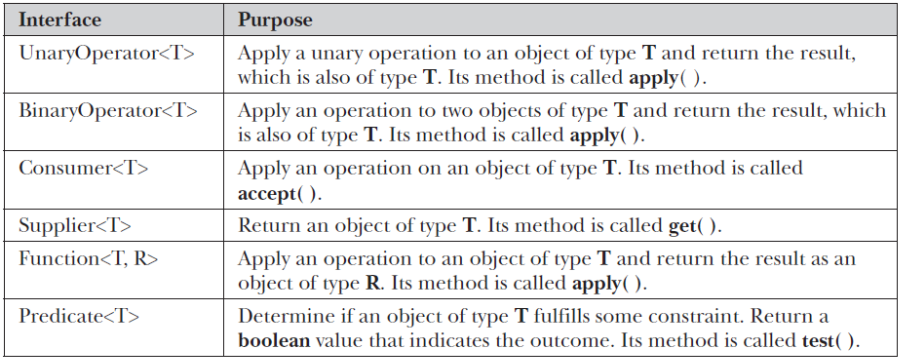
The following program shows the Function interface in action by using it to rework the earlier example called BlockLambdaExample that demonstrated block lambdas by implementing a factorial example. That example created its own functional interface called NumericFunc, but the built-in Function interface could have been used, as this version of the program illustrates:
//Use the Function built-in functional interface.
//Import the Function interface.
import java.util.function.Function;

public class FunctionExample {
	public static void main(String args[]) {
		// This block lambda computes the factorial of an int value.
		// This time, Function is the functional interface.
		Function<Integer, Integer> factorial = (n) -> {
			int result = 1;

			for (int i = 1; i <= n; i++)
				result = i * result;
			return result;
		};

		System.out.println("The factoral of 3 is " + factorial.apply(3));
		System.out.println("The factoral of 5 is " + factorial.apply(5));
	}
}
Streams API
- Java 8 introduces Stream, which is a new abstract layer, and some new additionalpackages in Java 8 called java.util.stream.
- A Stream is a sequence of components that can be processed sequentially.
- These packages include classes, interfaces, and enum to allow functional-styleoperations on the elements.
- The stream can be used by importing java.util.stream package.
- Stream API is used to process collections of objects.
- Streams are designed to be efficient and can support improving your program’sperformance by allowing you to avoid unnecessary loops and iterations.
- Streams can be used for filtering, collecting, printing, and converting from one datastructure to another, etc.
Features of Java Stream
- A stream is not a data structure instead it takes input from the Collections, Arrays, or I/Ochannels.
- Streams don’t change the original data structure, they only provide the result as per thepipelined methods.
- Each intermediate operation is lazily executed and returns a stream as a result, hencevarious intermediate operations can be pipelined. Terminal operations mark the end ofthe stream and return the result.
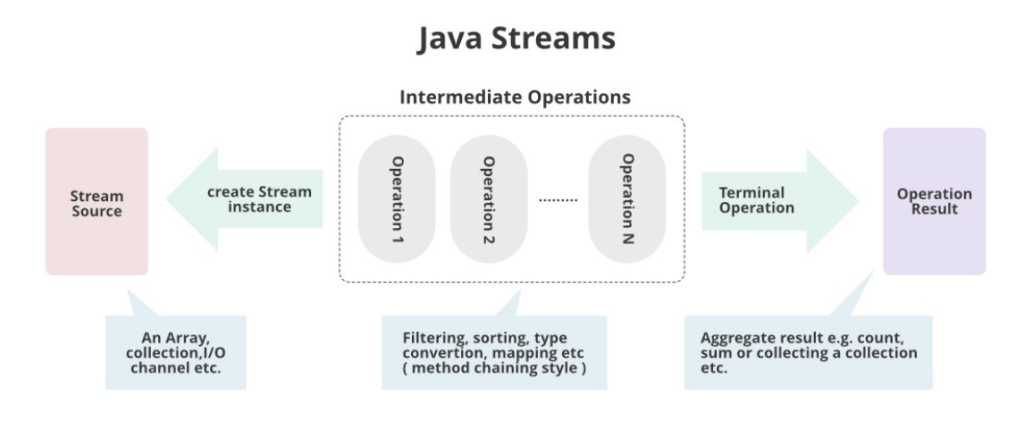
import java.util.Arrays;
import java.util.List;
import java.util.stream.Collectors;
import java.util.stream.Stream;

public class StreamExample {

	public static void main(String[] args) {
		// define a list of numbers
		List<Integer> numbers = Arrays.asList(1, 2, 3, 4, 5);

		// without stream
		// task: loop each number and get the square of each number, then display
		for (int n : numbers) {
			System.out.println("squares of " + n + " is " + (n * n));
		}

		// with stream
		// map() will take a Function as parameter
		// forEach() will take a Consumer as parameter
		numbers.stream().map(n -> n * n).forEach(n -> System.out.println(n));

		// another example using list of string values
		List<String> names = Arrays.asList("John", "Bob", "David", "Alan", "Andrew");

		// task: loop and filter - names start with 'A'
		List<String> result = names.stream().filter(s -> s.startsWith("A")).collect(Collectors.toList());
		result.stream().forEach(n -> System.out.println(n));

		// update list of numbers
		numbers = Arrays.asList(7, 18, 10, 24, 17, 5);
		System.out.println("Original list of numbers: " + numbers);

		// sort the numbers
		Stream<Integer> sorted = numbers.stream().sorted();
		sorted.forEach(n -> System.out.println(n));

		// get odd numbers
		Stream<Integer> oddNums = numbers.stream().sorted().filter(n -> (n % 2) == 1);
		oddNums.forEach(n -> System.out.println(n));

		// get odd numbers that is greater than 5
		oddNums = numbers.stream().sorted().filter(n -> (n % 2) == 1).filter(n -> n > 5);
		oddNums.forEach(n -> System.out.println(n));
	}

}