
Multithreaded Programming
- Java provides built-in support for multithreaded programming.
- A multithreaded program contains two or more parts that can run concurrently.
- Each part of such a program is called a thread, and each thread defines a separate path of execution.
- Thus, multithreading is a specialized form of multitasking.
Multithreaded Fundamentals
Process vs Thread
- A process is, in essence, a program that is executing.
- Thus, process-based multitasking is the feature that allows your computer to run two or more programs concurrently.
- For example, process-based multitasking enables you to run the Java compiler while you are using a text editor or visiting a web site.
- In a thread-based multitasking environment, the thread is the smallest unit of dispatchable code.
- This means that a single program can perform two or more tasks simultaneously.
- For instance, a text editor can format text while it is printing, if these two actions are being performed by two separate threads.
- Thus, process-based multitasking deals with the “big picture,” and thread-based multitasking handles the details.
- While Java programs make use of process-based multitasking environments, process-based multitasking is not under Java’s control. However, multithreaded multitasking is.
- Multithreading enables you to write efficient programs that make maximum use of the processing power available in the system.
Thread States
- A thread can be running.
- It can be ready to run as soon as it gets CPU time.
- A running thread can be suspended, which temporarily halts its activity.
- A suspended thread can then be resumed, allowing it to pick up where it left off.
- A thread can be blocked when waiting for a resource.
- At any time, a thread can be terminated, which halts its execution immediately.
- Once terminated, a thread cannot be resumed.
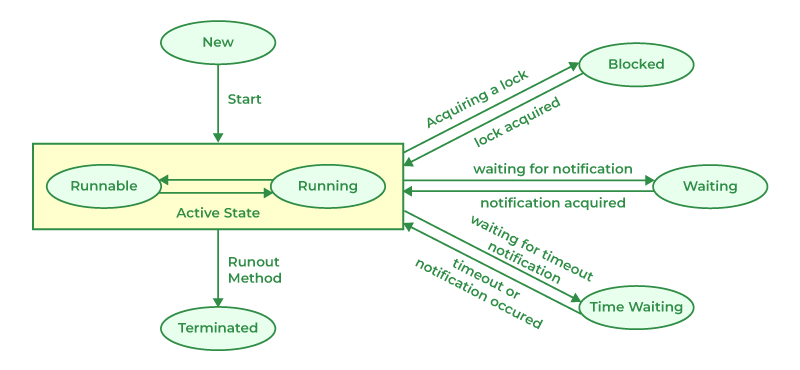
The Thread Class and Runnable Interface
Java’s multithreading system is built upon the Thread class, its methods, and its companion interface, Runnable. Thread encapsulates a thread of execution. Since you can’t directly refer to the ethereal state of a running thread, you will deal with it through its proxy, the Thread instance that spawned it.
To create a new thread, your program will either extend Thread or implement the Runnable interface. The Thread class defines several methods that help manage threads.
Java’s multithreading system is built upon the Thread class, its methods, and its companion interface, Runnable. Thread encapsulates a thread of execution. Since you can’t directly refer to the ethereal state of a running thread, you will deal with it through its proxy, the Thread instance that spawned it.
| Method | Meaning |
| getName | Obtain a thread’s name. |
| getPriority | Obtain a thread’s priority. |
| isAlive | Determine if a thread is still running. |
| join | Wait for a thread to terminate. |
| run | Entry point for the thread. |
| sleep | Suspend a thread for a period of time. |
| start | Start a thread by calling its run method. |
The Main Thread
When a Java program starts up, one thread begins running immediately. This is usually called the main thread of your program because it is the one that is executed when your program begins. The main thread is important for two reasons:
- It is the thread from which other “child” threads will be spawned.
- Often, it must be the last thread to finish execution because it performs various shutdown actions.
Although the main thread is created automatically when your program is started, it can be controlled through a Thread object. To do so, you must obtain a reference to it by calling the method currentThread( ), which is a public static member of Thread.
public class MainThreadExample {
	public static void main(String[] args) {
		// get the currently running thread
		Thread main = Thread.currentThread();

		System.out.println(main);

		// Thread[#1,main,5,main]
		/*
		 * #1 - id
		 * main - name
		 * 5 - priority
		 * main - method name
		 */

		// get id, name, priority
		System.out.println(main.getId());
		System.out.println(main.getName());
		System.out.println(main.getPriority());

		// set name and priority
		main.setName("mynamethread");
		main.setPriority(Thread.MAX_PRIORITY);
		System.out.println(main);

		// check if thread is alive
		System.out.println("main alive? " + main.isAlive());
	}
}
Creating a Thread
Java defines two ways in which this can be accomplished:
- Implement the Runnable interface.
- Extend the Thread class, itself.
Implementing Runnable
public class RunnableExample {
	public static void main(String[] args) {
		// create the job (runnable) and workers (thread)
		MyRunnable job = new MyRunnable();
		Thread worker1 = new Thread(job, "worker1");
		Thread worker2 = new Thread(job, "worker2");
		worker1.start();
		worker2.start();
	}
}

class MyRunnable implements Runnable {

	@Override
	public void run() {
		// get currently running thread name
		String threadName = Thread.currentThread().getName();

		System.out.println(threadName + " is running...");
		try {
			for (int i = 0; i < 10; i++) {
				// put thread to sleep to simulate long process
				Thread.sleep(1000);
				// after thread wakes up, continue here
				System.out.println("In " + threadName + " i=" + i);
			}
		} catch (InterruptedException ex) {
			// do nothing
		}
		System.out.println(threadName + " is terminating...");
	}

}
Extending Thread
public class ThreadExample {
	public static void main(String[] args) {
		// create threads and run it
		MyThread t1 = new MyThread("T1");
		MyThread t2 = new MyThread("T2");
		t1.start();
		t2.start();
	}
}

class MyThread extends Thread {
	String threadName;

	public MyThread(String name) {
		threadName = name;
	}

	@Override
	public void run() {
		System.out.println(threadName + " is running...");
		try {
			for (int i = 0; i < 10; i++) {
				// put thread to sleep to simulate long process
				Thread.sleep(1000);
				// after thread wakes up, continue here
				System.out.println("In " + threadName + " i=" + i);
			}
		} catch (InterruptedException ex) {
			// do nothing
		}
		System.out.println(threadName + " is terminating...");
	}
}
Determining When a Thread Ends
Two ways exist to determine whether a thread has finished: isAlive() and join() methods.
- The isAlive( ) method returns true if the thread upon which it is called is still running. It returns false otherwise.
- The join() method waits until the thread on which it is called terminates. Its name comes from the concept of the calling thread waiting until the specified thread joins it.
public class JoinExample {
	public static void main(String[] args) {
		// create threads and run it
		MyThread t1 = new MyThread("T1");
		MyThread t2 = new MyThread("T2");
		MyThread t3 = new MyThread("T3");
		MyThread t4 = new MyThread("T4");

		t1.start();
		t2.start();
		t3.start();
		t4.start();

		System.out.println(Thread.currentThread().getName() + " before join...");

		System.out.println("job1 is alive: " + t1.isAlive());
		System.out.println("job2 is alive: " + t2.isAlive());
		System.out.println("job3 is alive: " + t3.isAlive());
		System.out.println("job4 is alive: " + t4.isAlive());

		try {
			t1.join();
			t2.join();
		} catch (Exception ex) {
			System.out.println(ex.getMessage());
		}

		System.out.println(Thread.currentThread().getName() + " after join...");

		System.out.println("job1 is alive: " + t1.isAlive());
		System.out.println("job2 is alive: " + t2.isAlive());
		System.out.println("job3 is alive: " + t3.isAlive());
		System.out.println("job4 is alive: " + t4.isAlive());
	}
}
Thread Priorities
Thread priorities are used by the thread scheduler to decide when each thread should be allowed to run. In theory, over a given period of time, higher-priority threads get more CPU time than lower-priority threads.
A higher-priority thread can also preempt a lower-priority one. For instance, when a lower-priority thread is running and a higher-priority thread resumes (from sleeping or waiting on I/O, for example), it will preempt the lower-priority thread.
To set a thread’s priority, use the setPriority( ) method, which is a member of Thread.
final void setPriority(int level)
Here, level specifies the new priority setting for the calling thread. The value of level must be within the range MIN_PRIORITY and MAX_PRIORITY. Currently, these values are 1 and 10, respectively. To return a thread to default priority, specify NORM_PRIORITY, which is currently 5. These priorities are defined as static final variables within Thread.
You can obtain the current priority setting by calling the getPriority( ) method of Thread.
final int getPriority( )