
Introduction
- JDBC stands for Java Database Connectivity.
- JDBC is a Java API to connect and execute the query with the database.
- It is a specification from Sun Microsystems that provides a standard abstraction(API orProtocol) for Java applications to communicate with various databases.
- It provides the language with Java database connectivity standards. It is used to writeprograms required to access databases.
- JDBC, along with the database driver, can access databases and spreadsheets.
- The enterprise data stored in a relational database(RDB) can be accessed with the help ofJDBC APIs.
Purpose of JDBC
- Enterprise applications created using the JAVA EE technology need to interact withdatabases to store application-specific information.
- So, interacting with a database requires efficient database connectivity, which can beachieved by using the ODBC (Open database connectivity) driver.
- This driver is used with JDBC to interact or communicate with various kinds of databasessuch as Oracle, MS Access, Mysql, and SQL server database.
Components of JDBC
- JDBC API: It provides various methods and interfaces for easy communication with thedatabase. It provides two packages as follows, which contain the java SE and Java EEplatforms to exhibit WORA(write once run anywhere) capabilities. The java.sql packagecontains interfaces and classes of JDBC API.
- JDBC Driver manager: It loads a database-specific driver in an application to establish aconnection with a database. It is used to make a database-specific call to the database toprocess the user request.
- JDBC Test suite: It is used to test the operation(such as insertion, deletion, updation) beingperformed by JDBC Drivers.
- JDBC-ODBC Bridge Drivers: It connects database drivers to the database. This bridgetranslates the JDBC method call to the ODBC function call. It makes use of thesun.jdbc.odbc package which includes a native library to access ODBC characteristics.
Architecture of JDBC
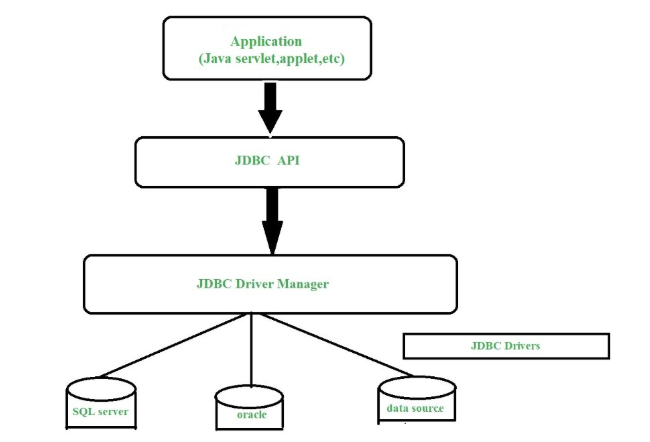
- Application: It is a java applet or a servlet that communicates with a data source.
- The JDBC API: The JDBC API allows Java programs to execute SQL statements and retrieveresults. Some of the important interfaces defined in JDBC API are as follows: Driverinterface , ResultSet Interface , RowSet Interface , PreparedStatement interface,Connection inteface, and cClasses defined in JDBC API are as follows: DriverManager class,Types class, Blob class, clob class.
- DriverManager: It plays an important role in the JDBC architecture. It uses some database-specific drivers to effectively connect enterprise applications to databases.
- JDBC drivers: To communicate with a data source through JDBC, you need a JDBC driverthat intelligently communicates with the respective data source.
Types of JDBC Architecture (2-tier and 3-tier)
- Two-tier model: A java application communicates directly to the data source.
- The JDBC driver enables the communication between the application and the data source.
- When a user sends a query to the data source, the answers for those queries are sentback to the user in the form of results.
- The data source can be located on a different machine on a network to which a user isconnected.
- This is known as a client/server configuration, where the user’s machine acts as a client,and the machine has the data source running acts as the server.
- Three-tier model: In this, the user’s queries are sent to middle-tier services, from whichthe commands are again sent to the data source.
- The results are sent back to the middle tier, and from there to the user.
- This type of model is found very useful by management information system directors.
What is API?
- API stands for Application Programming Interface.
- It is essentially a set of rules and protocols which transfers data between differentsoftware applications and allow different software applications to communicate with eachother.
- Through an API one application can request information or perform a function fromanother application without having direct access to its underlying code or the applicationdata.
- JDBC API uses JDBC Drivers to connect with the database.
JDBC Drivers
- JDBC drivers are client-side adapters (installed on the client machine, not on the server)that convert requests from Java programs to a protocol that the DBMS can understand.
- There are 4 types of JDBC drivers:
- Type-1 driver or JDBC-ODBC bridge driver
- Type-2 driver or Native-API driver (partially java driver)
- Type-3 driver or Network Protocol driver (fully java driver)
- Type-4 driver or Thin driver (fully java driver)
The JDBC drivers can be downloaded from here https://jdbc.postgresql.org/download/
Example
Note: Make sure to download and add the JDBC driver to your project before proceed.
To add the driver to your project, right-click project > Build Path > Configure Build Path
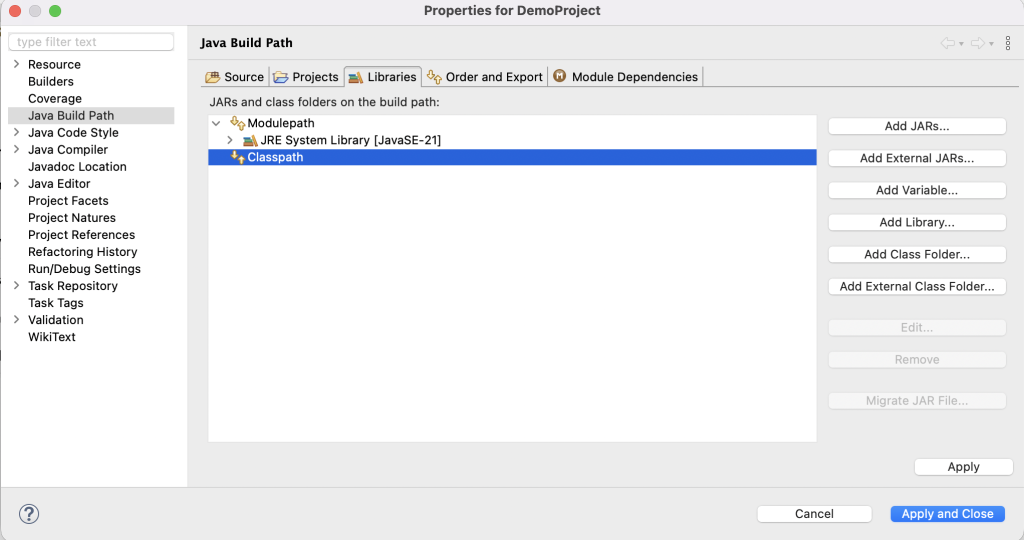
Click on Add External JARs and browse for the file, then click Apply and Close.
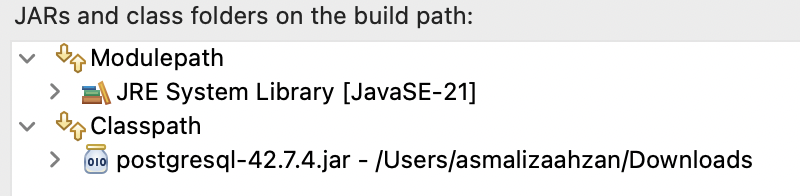
Run the script below in pgAdmin to create a sample table to be used with this example.
-- Table: public.student

-- DROP TABLE IF EXISTS public.student;

CREATE TABLE IF NOT EXISTS public.student
(
    id integer NOT NULL,
    name text COLLATE pg_catalog."default" NOT NULL,
    email text COLLATE pg_catalog."default",
    CONSTRAINT student_pkey PRIMARY KEY (id)
)

TABLESPACE pg_default;

ALTER TABLE IF EXISTS public.student
    OWNER to postgres;
Begin the program by defining list of variables with database configurations.
import java.sql.Connection;

public class DatabaseExample {

	// define database configurations
	static String dbname = "testdb";
	static String url = "jdbc:postgresql://localhost:5432/" + dbname;
	static String username = "postgres";
	static String password = "Pa$$w0rd"; // your own password here
	static Connection conn;

}
Then add the main method that contain codes to connect to the database.
	public static void main(String[] args) {
		try {
			// make a connection to database
			conn = DriverManager.getConnection(url, username, password);

			// check if successfully connected
			if (conn != null) {
				System.out.println(String.format("Successfully connected to %s!", dbname));
			}

		} catch (Exception ex) {
			System.out.println(ex.getMessage());
		}
	}
// method to insert record to table
public static void addNew(int id, String name, String email) {
// prepare query
String query = "insert into student (id, name, email) values (?, ?, ?)";
// execute query
try {
// create prepared statement
PreparedStatement stmt = conn.prepareStatement(query);
// set parameter values
stmt.setInt(1, id);
stmt.setString(2, name);
stmt.setString(3, email);
stmt.executeUpdate();
System.out.println("New record added.");
} catch (Exception ex) {
System.out.println(ex.getMessage());
}
} // method to get all records
public static void getAll() {
String query = "select * from student";
try {
PreparedStatement stmt = conn.prepareStatement(query);
// execute query and get result
ResultSet result = stmt.executeQuery();
// display result
String header = String.format("%-10s %-30s %-30s", "ID", "Name", "Email");
System.out.println(header);
// retrieve result
while (result.next()) {
int id = result.getInt("id");
String name = result.getString("name");
String email = result.getString("email");
System.out.println(String.format("%-10s %-30s %-30s", id, name, email));
}
} catch (Exception ex) {
System.out.println(ex.getMessage());
}
} // method to update record
public static void update(int id, String name, String email) {
// prepare query
String query = "update student set name=?, email=? where id=?";
// execute query
try {
// create prepared statement
PreparedStatement stmt = conn.prepareStatement(query);
// set parameter values
stmt.setInt(3, id);
stmt.setString(1, name);
stmt.setString(2, email);
stmt.executeUpdate();
System.out.println("Record updated.");
} catch (Exception ex) {
System.out.println(ex.getMessage());
}
} // method to delete a record
public static void delete(int id) {
try {
PreparedStatement stmt = conn.prepareStatement("delete from student where id=?");
stmt.setInt(1, id);
if (stmt.executeUpdate() == 1) {
System.out.println("Student deleted: " + id);
} else {
System.out.println("Student not deleted.");
}
} catch (Exception ex) {
System.out.println(ex.getMessage());
}
}