
Java’s I/O is Built upon Streams
- Java programs perform I/O through streams.
- A stream is an abstraction that either produces or consumes information.
- A stream is linked to a physical device by the Java I/O system.
- This means that an input stream can abstract many kinds of input: from a disk file, a keyboard, or a network socket.
- Likewise, an output stream may refer to the console, a disk file, or a network connection.
- Java implements streams within class hierarchies defined in the java.io package.
Byte Streams and Character Streams
- Java defines two types of streams: byte and character.
- Byte streams provide a convenient means for handling input and output of bytes.
- Byte streams are used, for example, when reading or writing binary data.
- Character streams provide a convenient means for handling input and output of characters.
- They use Unicode and, therefore, can be internationalized.
- Also, in some cases, character streams are more efficient than byte streams.
The Byte Stream Classes
- Byte streams are defined by using two class hierarchies.
- At the top are two abstract classes: InputStream and OutputStream.
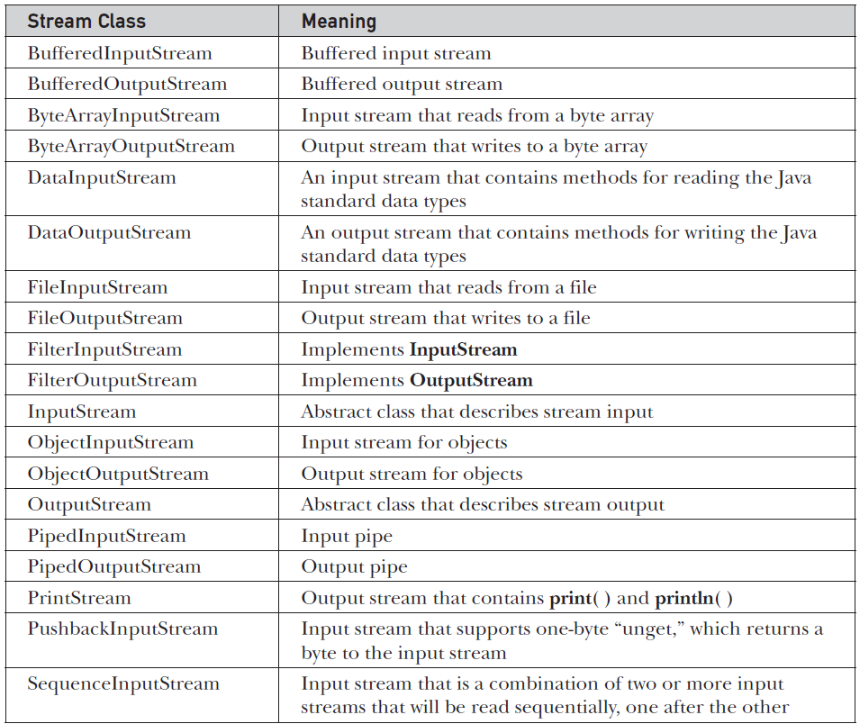
- Each of these abstract classes has several concrete subclasses that handle the differences among various devices, such as disk files, network connections, and even memory buffers.
- The byte stream classes in java.io are shown in the next table.
- The abstract classes InputStream and OutputStream define several key methods that the other stream classes implement.
- Two of the most important are read( ) and write( ), which, respectively, read and write bytes of data.
- Each has a form that is abstract and must be overridden by derived stream classes.
The Character Stream Classes
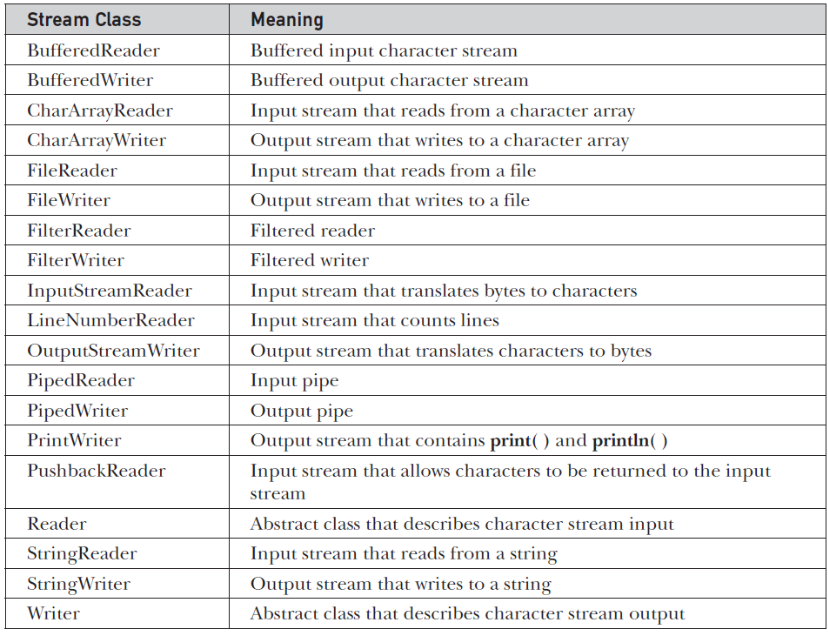
- Character streams are defined by using two class hierarchies.
- At the top are two abstract classes: Reader and Writer.
The Predefined Streams
- All Java programs automatically import the java.lang package.
- This package defines a class called System, which encapsulates several aspects of the run-time environment.
- System also contains three predefined stream variables: in, out, and err.
- These fields are declared as public, static, and final within System.
- This means that they can be used by any other part of your program and without reference to a specific System object.
Using the Byte Streams
Let’s explore FileInputStream and FileOutputStream by examining an example program named ByteStreamExample, which uses byte streams to copy test.txt, one byte at a time to another output file.
import java.io.FileInputStream;
import java.io.FileOutputStream;
import java.io.IOException;

public class ByteStreamExample {
	public static void main(String[] args) throws IOException {
		// this example will copy file contents
		FileInputStream in = new FileInputStream("test.txt");
		FileOutputStream out = new FileOutputStream("outtest.txt");

		int read = 0;
		while ((read = in.read()) != -1) {
			out.write(read);
		}
	}
}
ByteStreamExample spends most of its time in a simple loop that reads the input stream and writes the output stream, one byte at a time.
Automatically Closing a File
- JDK 7 added a new feature that offers another way to manage resources, such as file streams, by automating the closing process.
- This feature, sometimes referred to as automatic resource management, or ARM for short, is based on an expanded version of the try statement.
- The principal advantage of automatic resource management is that it prevents situations in which a file (or other resource) is inadvertently not released after it is no longer needed.
Below is the updated ByteStreamExample using the try-with-resources.
import java.io.FileInputStream;
import java.io.FileOutputStream;
import java.io.IOException;

public class ByteStreamExample {
	public static void main(String[] args) {
		// this example will copy file contents
		try (FileInputStream in = new FileInputStream("test.txt");
				FileOutputStream out = new FileOutputStream("outtest.txt");) {

			int read = 0;
			while ((read = in.read()) != -1) {
				out.write(read);
			}
		} catch (IOException ex) {
			System.out.println(ex.getMessage());
		}
	}
}
Using the Character Streams
The following Java program reads data from a particular file using FileReader and writes it to another, using FileWriter.
import java.io.FileReader;
import java.io.FileWriter;
import java.io.IOException;

public class CharacterStreamExample {
	public static void main(String[] args) {
		// this example will copy file contents
		try (FileReader in = new FileReader("test.txt");
				FileWriter out = new FileWriter("outtest.txt");) {

			int read = 0;
			while ((read = in.read()) != -1) {
				out.write(read);
			}
		} catch (IOException ex) {
			System.out.println(ex.getMessage());
		}
	}
}