
Exceptions are a mechanism used by many programming languages to describe what to do when something unexpected happens.
Typically, something unexpected is an error of some sort, for example when a method is invoked with unacceptable arguments, or a network connection fails, or the use asks to open a non-existent file.
The Exception Hierarchy
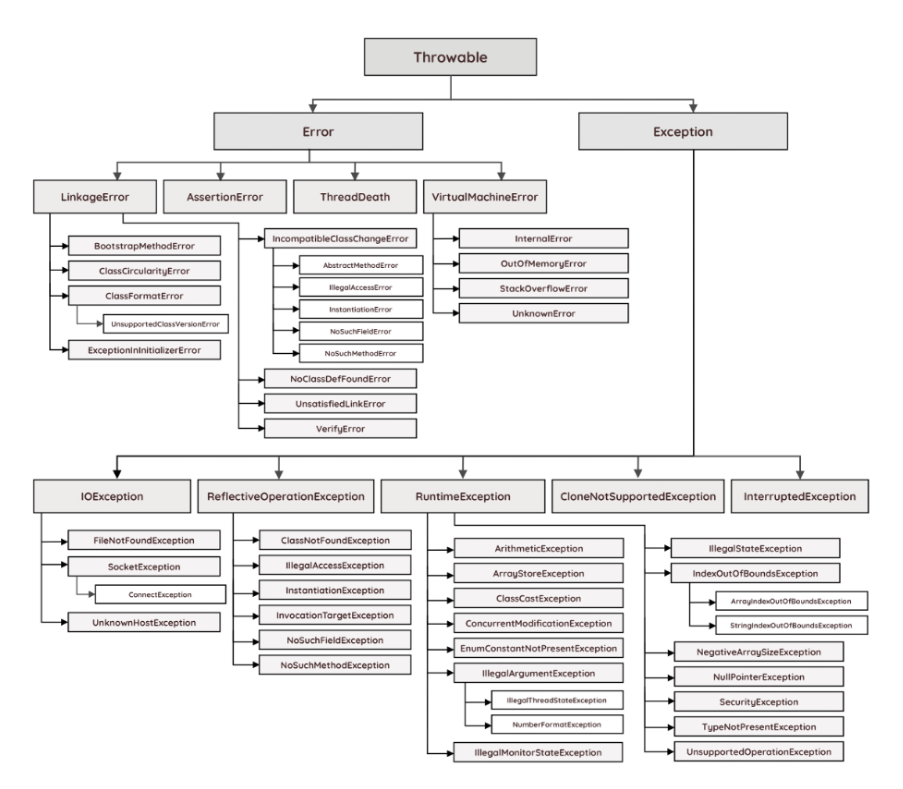
Exception Handling Fundamentals
- A Java exception is an object that describes an exceptional (that is, error) condition that has occurred in a piece of code.
- When an exceptional condition arises, an object representing that exception is created and thrown in the method that caused the error.
- That method may choose to handle the exception itself or pass it on.
- Either way, at some point, the exception is caught and processed.
- Exceptions can be generated by the Java run-time system, or they can be manually generated by your code.
- Java exception handling is managed via five keywords: try, catch, throw, throws, and finally.
try {
// block of code to monitor for errors
}
catch (ExceptionType1 exOb) {
// exception handler for ExceptionType1
}
catch (ExceptionType2 exOb) {
// exception handler for ExceptionType2
}
// …
finally {
// block of code to be executed after try block ends
}
The Consequences of an Uncaught Exception
Technically, any thrown exceptions must be handled some where within the program. Any exception that is not caught by your program will ultimately be processed by the default handler. The default handler displays a string describing the exception, prints a stack trace from the point at which the exception occurred, and terminates the program.
Using Multiple catch Statements
- In some cases, more than one exception could be raised by a single piece of code.
- To handle this type of situation, you can specify two or more catch clauses, each catching a different type of exception.
- When an exception is thrown, each catch statement is inspected in order, and the first one whose type matches that of the exception is executed.
public class MultiCatchExample {
	public static void main(String[] args) {

		try {
			int a = args.length;
			System.out.println("a = " + a);

			int b = 42 / a;
			int c[] = { 1 };
			c[42] = 99;

		} catch (ArithmeticException e) {
			System.out.println("Divide by 0: " + e);

		} catch (ArrayIndexOutOfBoundsException e) {
			System.out.println("Array index oob: " + e);

		}
		System.out.println("After try/catch blocks.");
	}
}
Catching Subclass Exceptions
There is one important point about multiple catch statements that relates to subclasses.
- A catch clause for a superclass will also match any of its subclasses.
- For example, since the superclass of all exceptions is Throwable, to catch all possible exceptions, catch Throwable.
- If you want to catch exceptions of both a superclass type and a subclass type, put the subclass first in the catch sequence. If you don’t, then the superclass catch will also catch all derived classes.
- This rule is self-enforcing because putting the superclass first causes unreachable code to be created, since the subclass catch clause can never execute.
- In Java, unreachable code is an error.
Try Blocks Can Be Nested
- The try statement can be nested. That is, a try statement can be inside another try block.
- If an inner try statement does not have a catch handler for a particular exception, the stack in unwound and the next try statement’s catch handlers are inspected for a match.
- This continues until one of the catch statements succeed, or until all the nested try statements are exhausted.
- If no catch statement matches, then the Java run-time system (default handler) will handle the exception.
public class NestedTryExample {
	public static void main(String[] args) {
		// Main try block
		try {
			// Initializing array
			int a[] = { 1, 2, 3, 4, 5 };

			// Trying to print element at index 5
			System.out.println(a[5]);

			// Inner try block (try-block2)
			try {
				// Performing division by zero
				int x = a[2] / 0; // This will throw ArithmeticException

			} catch (ArithmeticException e2) {
				System.out.println("Division by zero is not possible");
			}

		} catch (ArrayIndexOutOfBoundsException e1) {
			System.out.println("ArrayIndexOutOfBoundsException");
			System.out.println("Element at such index does not exist");
		}
	}
}
Throwing an Exception
- Before you can catch an exception, some code somewhere must throw one.
- Any code can throw an exception: your code, code from a package written by someone else such as the packages that come with the Java platform, or the Java runtime environment.
- Regardless of what throws the exception, it’s always thrown with the throw statement.
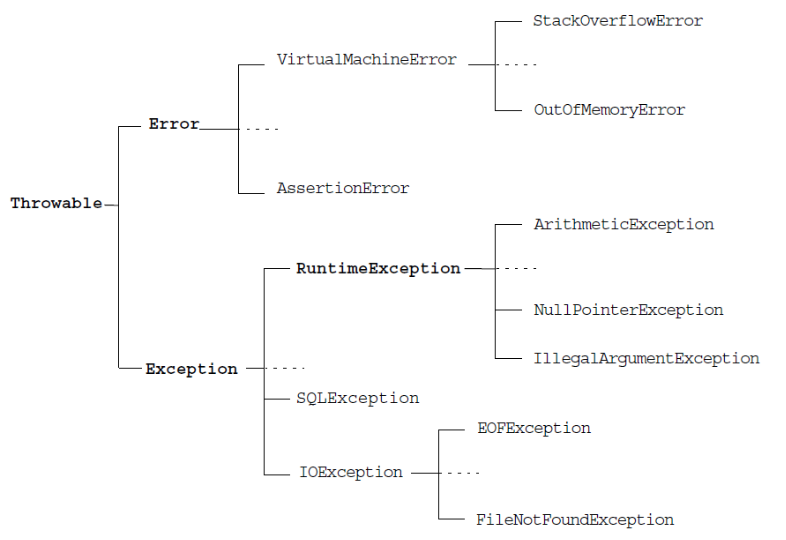
A Closer Look at Throwable
- The class java.lang.Throwable acts as the parent class for all objects that can be thrown and caught using the exception-handling mechanisms.
- Methods defined in the Throwable class retrieve the error message associated with the exception and print the stack trace showing where the exception occurred.
- There are three key subclasses of Throwable: Error, RuntimeException and Exception.
Using Throw
- To throw an exception explicitly, using the throw statement. The general form of throw is shown here:
throw ThrowableInstance; - The flow of execution stops immediately after the throw statement; any subsequent statements are not executed.
- The nearest enclosing try block is inspected to see if it has a catch statement that matches the type of exception.
- If it does find a match, control is transferred to that statement. If not, then the next enclosing try statement is inspected, and so on. If no matching catch is found, then the default exception handler halts the program and prints the stack trace.
import java.io.BufferedReader;
import java.io.FileNotFoundException;
import java.io.FileReader;
import java.io.IOException;

public class ThrowExample {
	public static void main(String[] args) {
		String filename = "test.txt";
		try {
			callthis(filename);
		} catch (IOException e) {
			System.out.println(e.getMessage());
		}
	}

	private static void callthis(String filename) throws IOException {
		try {
			BufferedReader reader = new BufferedReader(new FileReader(filename));
		} catch (FileNotFoundException e) {
			throw new IOException(e.getMessage());
		}
	}
}
Using Throws
- If a method can cause an exception that it does not handle, it must specify this behaviour so that callers of the method can guard themselves against that exception.
- You do this by including a throws clause in the method’s declaration.
- A throws clause lists the types of exceptions that a method might throw.
import java.io.BufferedReader;
import java.io.FileNotFoundException;
import java.io.FileReader;
import java.io.IOException;

public class ThrowExample {
	public static void main(String[] args) {
		String filename = "test.txt";
		try {
			callme(filename);
		} catch (IOException e) {
			System.out.println(e.getMessage());
		}
	}

	private static void callme(String filename) throws IOException {
		BufferedReader reader = new BufferedReader(new FileReader(filename));
		String line = reader.readLine();
		while (line != null) {
			System.out.println(line);
		}
	}
}
Using Finally
- finally creates a block of code that will be executed after a try /catch block has completed and before the code following the try/catch block.
- The finally block will execute whether or not an exception is thrown.
- If an exception is thrown, the finally block will execute even if no catch statement matches the exception.
- This can be useful for closing file handles and freeing up any other resources that might have been allocated at the beginning of a method with the intent of disposing of them before returning.
- The finally clause is optional.
import java.io.BufferedReader;
import java.io.FileNotFoundException;
import java.io.FileReader;
import java.io.IOException;

public class ThrowExample {
	public static void main(String[] args) {
		String filename = "test.txt";
		try {
			callme(filename);
		} catch (IOException e) {
			System.out.println(e.getMessage());
		} finally {
			System.out.println("Bye-bye!");
		}
	}

	private static void callthis(String filename) throws IOException {
		try {
			BufferedReader reader = new BufferedReader(new FileReader(filename));
		} catch (FileNotFoundException e) {
			throw new IOException(e.getMessage());
		}
	}

	private static void callme(String filename) throws IOException {
		BufferedReader reader = new BufferedReader(new FileReader(filename));
		String line = reader.readLine();
		while (line != null) {
			System.out.println(line);
		}
	}
}
Three Additional Exception Features
Beginning with JDK 7, three interesting and useful features have been added to the exception system. The first automates the process of releasing a resource, such as a file, when it is no longer needed. The second feature is called multi-catch, and the third is sometimes referred to as final rethrow or more precise rethrow.
The try-with-resources Statement
The try-with-resources statement is a try statement that declares one or more resources. A resource is an object that must be closed after the program is finished with it. The try-with-resources statement ensures that each resource is closed at the end of the statement. Any object that implements java.lang.AutoCloseable, which includes all objects which implement java.io.Closeable, can be used as a resource.
The following example reads the first line from a file. It uses an instance of BufferedReader to read data from the file. BufferedReader is a resource that must be closed after the program is finished with it:
import java.io.BufferedReader;
import java.io.FileReader;
import java.io.IOException;

public class TryResourceExample {
	public static void main(String[] args) {
		String filename = "test.txt";

		try (BufferedReader reader = new BufferedReader(new FileReader(filename))) {
			String line = reader.readLine();
			while (line != null) {
				System.out.println(line);
			}
		} catch (IOException e) {
			System.out.println(e.getMessage());
		} finally {
			System.out.println("Bye-bye!");
		}
	}
}
Handling More Than One Type of Exceptions
In Java SE 7 and later, a single catch block can handle more than one type of exception. This feature can reduce code duplication and lessen the temptation to catch an overly broad exception.
public class MultiExceptionExample {
	public static void main(String[] args) {
		try {
			int a = args.length;
			System.out.println("a = " + a);

			int b = 42 / a;
			int c[] = { 1 };
			c[42] = 99;

		} catch (ArithmeticException | ArrayIndexOutOfBoundsException e) {
			System.out.println(e.getMessage());
		}
	}
}
Rethrowing Exceptions with More Inclusive Type Checking
The Java SE 7 compiler performs more precise analysis of rethrown exceptions than earlier releases of Java SE. This enables you to specify more specific exception types in the throws clause of a method declaration. Consider the following example:
public class RethrowingExample {
	public static void main(String[] args) {
		try {
			rethrowException("First");
		} catch (Exception e) {
			System.out.println(e.getMessage());
		}
	}

	public static void rethrowException(String exceptionName) throws Exception {
		try {
			if (exceptionName.equals("First")) {
				throw new FirstException();
			} else {
				throw new SecondException();
			}
		} catch (Exception e) {
			throw e;
		}
	}
}

class FirstException extends Exception {
	// class definition goes here
}

class SecondException extends Exception {
	// class definition goes here
}
This examples’s try block could throw either FirstException or SecondException. Suppose you want to specify these exception types in the throws clause of the rethrowException method declaration. In releases prior to Java SE 7, you cannot do so. Because the exception parameter of the catch clause, e, is type Exception, and the catch block rethrows the exception parameter e, you can only specify the exception type Exception in the throws clause of the rethrowException method declaration.
However, in Java SE 7, you can specify the exception types FirstException and SecondException in the throws clause in the rethrowException method declaration. The Java SE 7 compiler can determine that the exception thrown by the statement throw e must have come from the try block, and the only exceptions thrown by the try block can be FirstException and SecondException. Even though the exception parameter of the catch clause, e, is type Exception, the compiler can determine that it is an instance of either FirstException or SecondException:
public class RethrowingExample {
	public static void main(String[] args) {
		try {
			rethrowException("First");
		} catch (Exception e) {
			System.out.println(e.getMessage());
		}
	}

	public static void rethrowException(String exceptionName) throws FirstException, SecondException {

		if (exceptionName.equals("First")) {
			throw new FirstException();
		} else {
			throw new SecondException();
		}

	}
}

class FirstException extends Exception {
	// class definition goes here
}

class SecondException extends Exception {
	// class definition goes here
}
Java’s Built-In Exceptions
- Inside the standard package java.lang, Java defines several exception classes.
- There are two broad categories of exceptions, known as checked and unchecked exceptions.
- The most general of these unchecked exceptions are subclasses of the standard type RuntimeException. These exceptions need not be included in any method’s throws list.
- In the language of Java, these are called unchecked exceptions because the compiler does not check to see if a method handles or throws these exceptions.
- Checked exceptions are those that the programmer is expected to handle in the program, and that arise from external conditions that can readily occur in a working program. Examples would be a requested file not being found or a network failure.
Creating Exception Subclasses
- This is quite easy to do: just define a subclass of Exception.
- Your subclasses don’t need to implement anything – it is their existence in the type of system that allows you to use them as exceptions.
public class SubExceptionExample {
	public static void main(String[] args) {
		String filename = "test.txt";
		try {
			callthis(filename);
		} catch (MyOwnException e) {
			System.out.println(e.getName() + " is thrown...");
			System.out.println(e.getMsg());
		} finally {
			System.out.println("Bye-bye!");
		}
	}

	private static void callthis(String filename) throws MyOwnException {
		try {
			BufferedReader reader = new BufferedReader(new FileReader(filename));
		} catch (FileNotFoundException e) {
			throw new MyOwnException(e.getMessage());
		}
	}
}

class MyOwnException extends Exception {
	String name = "MyOwnException";
	String msg = String.format("[%s] ", name);

	public MyOwnException(String msg) {
		this.msg += msg;
	}

	public String getName() {
		return name;
	}

	public String getMsg() {
		return msg;
	}
}