
Arrays
- An array is a group of like-typed variables that are referred to by a common name.
- Array of any type (primitive or class) can be created and may have one or more dimensions.
- A specific element in an array is accessed by its index.
- Arrays offer a convenient means of grouping related information.
- In Java, an array is an object.
- Array is a fixed size list of values.
- When declaring an array, the size must be supplied.
One-Dimensional Arrays
- A one-dimensional array is, essentially, a list of like-typed variables.
- Syntax to declare a one-dimensional array.
type array-var = new type [size];
int month_days = new int[12]; - To access and display array element, use the index.
System.out.println(month_days[3]);
Multi-Dimensional Array
- In Java, multidimensional arrays are actually arrays of arrays.
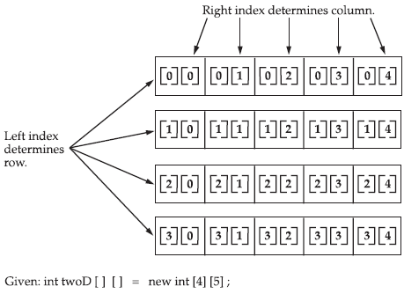
- To declare a multidimensional array variable, specify each additional index using another set of square brackets.
int twoD[][] = new int[4][5]; - This allocates a 4 by 5 array and assigns it to twoD.
- Internally, this matrix is implemented as an array of arrays of int.
Jagged Array
- When you allocate memory for a multidimensional array, you need only specify the memory for the first (leftmost) dimension.
- You can allocate the remaining dimensions separately.
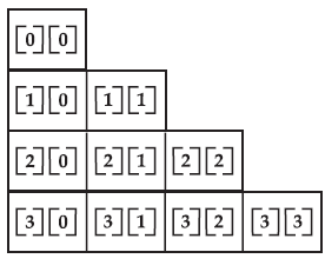
int twoD[][] = new int[4][];
twoD[0] = new int[1];
twoD[1] = new int[2];
twoD[2] = new int[3];
twoD[3] = new int[4];
The array created by this program looks like this:
Alternative Array Declaration Syntax
- There is a second form that may be used to declare an array:
type[ ] var-name; - Here, the square brackets follow the type specifier, and not the name of the array variable.
- For example, the following two declarations are equivalent:
int al[] = new int[3];
int[] a2 = new int[3]; - This alternative declaration form offers convenience when declaring several arrays at the same time.
int[] nums, nums2, nums3; // create three arrays
int nums[], nums2[], nums3[]; // create three arrays
Assigning Array References
- As with other objects, when you assign one array reference variable to another, you are simply changing what object that variable refers to.
- You are not causing a copy of the array to be made, nor are you causing the contents of one array to be copied to the other.
Using the length Member
- All array indices in Java begin at 0.
- The number of elements in an array is stored as part of the array object in the length attribute.
- If an out-of-bounds runtime access occurs, then a runtime exception is thrown.
		int[] arr = new int[5];
		int arrayLength = arr.length;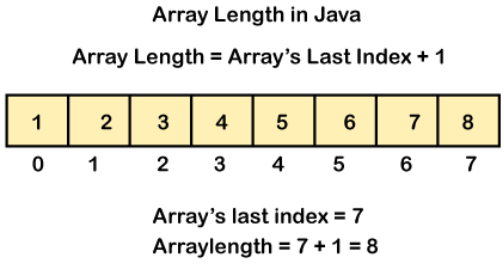
The foreach Style For Loop
- For-each is another array traversing technique like for loop, while loop, do-while loop introduced in Java5.
- It starts with the keyword for like a normal for-loop.
- Instead of declaring and initializing a loop counter variable, you declare a variable that is the same type as the base type of the array, followed by a colon, which is then followed by the array name.
- In the loop body, you can use the loop variable you created rather than using an indexed array element.
- It’s commonly used to iterate over an array or a Collections class (eg, ArrayList)
		int[] numbers = { 1, 2, 3, 4, 5 };
		int total = 0;

		for (int num : numbers) {
			total += num;
		}

		System.out.println("Total is " + total);
String
- Java’s string type, called String, is not a primitive type.
- It is in fact a class.
- When you declare a variable of type String, you basically creating an object.
- String class is immutable.
- When you create a String object, you are creating a string that cannot be changed. That is, once a String object has been created, you cannot change the characters that comprise that string.
- Each time you need an altered version of an existing string, a new String object is created that contains the modifications. The original string is left unchanged.
String Declarations
There are two ways to declare String variables.
		// literals
		String name = "John Smith";

		// constructor
		String email = new String("john@example.com");
String Length
The length of a string is the number of characters that it contains. To obtain this value, call the length() method.
		char chars[] = { 'a', 'b', 'c' };
		String s = new String(chars);

		// both will return 3
		System.out.println(s.length());
		System.out.println(chars.length);
String Concatenation
- In general, Java does not allow operators to be applied to String objects.
- The one exception to this rule is the + operator, which concatenates two strings, producing a String object as the result.
		String age = "9";
		String stmt = "He is " + age + " years old.";
		System.out.println(stmt);

		// Output: He is 9 years old.
Using Command-Line Arguments
- Sometimes you will want to pass information into a program when you run it.
- This is accomplished by passing command-line arguments to main( ).
- To access the command-line arguments inside a Java program is quite easy – they are stored as strings in a String array passed to the args parameter of main( ).
- The first command-line argument is stored at args[0], the second at args[1], and so on.
public class ArgsExample {
	public static void main(String[] args) {
		/*
		 * access program arguments and then display to console
		 */

		System.out.println(args[0]); // hello
		System.out.println(args[1]); // 1
		System.out.println(args[2]); // 2
		System.out.println(args[3]); // 3

		// using foreach loop
		for (String s : args) {
			System.out.println(s);
		}
	}
}
Using Type Inference with Local Variables
- Java 10 introduced a new shiny language feature called local variable type inference.
- Until Java 9, we had to mention the type of the local variable explicitly and ensure it was compatible with the initializer used to initialize it:
String message = “Good bye, Java 9”; - In Java 10, this is how we could declare a local variable:
var message = “Hello, Java 10”; - Note that this feature is available only for local variables with the initializer.
- It cannot be used for member variables, method parameters, return types, etc – the initializer is required as without which compiler won’t be able to infer the type.
- This enhancement helps in reducing the boilerplate code; for example:
Map<Integer, String> map = new HashMap<>(); - This can now be rewritten as:
var idToNameMap = new HashMap<Integer, String>(); - Another thing to note is that var is not a keyword – this ensures backward compatibility for programs using var say, as a function or variable name.
- var is a reserved type name, just like int.
- Finally, note that there is no runtime overhead in using var nor does it make Java a dynamically typed language.
- The type of the variable is still inferred at compile time and cannot be changed later.